
Amazon PPC Guide: Master Amazon’s Pay-Per-Click Ads
Amazon PPC (Pay-Per-Click) is Amazon’s internal advertising system that lets sellers pay for visibility on the marketplace. In simple terms, you bid on keywords so your product can show up as a “Sponsored” listing when shoppers search for those terms. You only pay when someone clicks your ad (hence pay-per-click). This system is Amazon’s version of search advertising, similar to Google Ads but for products on Amazon’s platform.
For sellers, Amazon PPC solves a critical problem: visibility. With millions of products on Amazon, a new or lesser-known listing can be buried deep in search results. If your product isn’t on the first page, most shoppers will never see it. In fact, about 70% of Amazon shoppers never go past the first page[1]. This is where PPC comes in. By paying for ad placement, your product can appear at the top of search results, even if your organic ranking is low. For example, a brand-new kitchen gadget might initially sit on page 5 with few views.
But with a PPC ad targeting “kitchen gadget” keywords, that product could immediately show up on page 1 as a sponsored result, grabbing eyeballs and clicks. In a nutshell, Amazon PPC gives you a way to buy traffic and visibility on a “pay when they click” model, helping you reach shoppers you otherwise wouldn’t.
Why does this matter? Because visibility directly ties to sales. A product that’s seen more often has a higher chance to be bought. Amazon PPC not only drives direct sales but can also boost your organic sales over time. When your ad generates purchases, it improves your product’s sales history and conversion rate, which are factors in Amazon’s organic ranking algorithm.
Over time, a successful PPC campaign can lift your product’s natural search ranking (so you get more “free” organic traffic). In summary, Amazon PPC is a crucial tool for sellers to gain immediate exposure, compete with established products, and accelerate sales growth in Amazon’s crowded marketplace. It’s often said that Amazon is a pay-to-play market – PPC is essentially the “pay” part of that equation. Sellers who leverage PPC wisely can level the playing field and ensure their products get in front of the right shoppers.
How Amazon PPC Works: Bidding and Ad Types Explained
At its core, Amazon PPC works on a bidding system and keyword targeting. Here’s the breakdown of how it works and the key components involved:
-
Auction-Based Bidding: Every time a shopper searches for something on Amazon, an ad auction happens in the background. Sellers bid on specific keywords (or product targets), indicating how much they’re willing to pay for a click. Amazon evaluates all the relevant bids along with the ad’s relevance to decide whose ad shows up. Importantly, Amazon uses a second-price auction model – meaning if you win the bid, you pay only about $0.01 more than the next highest bidder for that click, not necessarily your full bid amount. For example, if you bid $2.00 and the next highest bid is $1.50, you might only pay around $1.51 per click to win the placement. This ensures you get the placement at the lowest possible cost needed to outbid competitors.
-
Pay-Per-Click (PPC) Pricing: You aren’t charged for your ad just showing up (impressions); you only pay when someone clicks it. If your ad is displayed 1,000 times but gets no clicks, you pay nothing. This model is cost-effective because you’re essentially paying for actual interested visitors. The cost per click (CPC) can vary widely based on how competitive the keyword is. On Amazon, the average CPC is roughly around $1 (as of 2025), but it ranges from a few cents to several dollars depending on the product category and keyword popularity. Highly competitive niches (like electronics or supplements) have higher CPCs, while niche or long-tail keywords cost less.
-
Targeting and Keywords: Amazon PPC allows you to target ads in a couple of ways. The most common is keyword targeting, where you bid on search terms shoppers use (e.g., “wireless headphones” or “organic dog treats”). You can also target by product or category (product targeting), which means your ad can show up on specific product detail pages (for instance, on a competitor’s product page). Within keyword targeting, Amazon offers match types (broad, phrase, exact) that determine how closely a shopper’s query must match your keyword – broad match gives Amazon more leeway to show your ad on related searches, while exact match is very specific to the keyword you bid on.
-
Automatic vs. Manual Campaigns: When setting up Amazon PPC, you have the option of letting Amazon do the heavy lifting through Automatic campaigns or taking control with Manual campaigns. In an Automatic campaign, you don’t choose keywords at all – Amazon’s algorithm will automatically match your ads to relevant search terms and products based on your listing content. This is great for beginners or for discovering new keywords, because Amazon will test a broad range of terms to see what works. In a Manual campaign, you select the keywords or product targets yourself, giving you more precision. Often, a smart strategy is to start with an automatic campaign to gather data on which search queries lead to clicks and sales, then move those winning keywords into a manual campaign for fine-tuned bidding.
Ad Types on Amazon:
There are three primary types of PPC ads on Amazon, each with its own purpose and placement. It’s important to know the differences:
| Amazon PPC Ad Type | Where Ads Appear | Purpose & Features |
|---|---|---|
| Sponsored Products | In search results (top, middle, bottom) and on product detail pages | Promotes individual product listings. Looks like a regular product result with a “Sponsored” tag. Ideal for driving direct product sales. Targets keywords or products; available to most sellers (requires Buy Box). |
| Sponsored Brands | Top of search results as a banner (headline), also video ads in search results | Showcases a brand logo, a custom headline, and multiple products or a single video. Great for building brand awareness and directing shoppers to your Brand Store or a landing page with a selection of your products. (Available to Brand Registered sellers.) |
| Sponsored Display | On Amazon product pages (e.g., “Sponsored products related to this item” sections) and across Amazon’s advertising network (third-party websites or apps) | Display ads that can retarget shoppers who viewed your product or similar products. Useful for re-engaging past visitors or cross-promoting to relevant audiences. Can appear as banner ads or product suggestions on Amazon and beyond. |
Sponsored Products
These are the most common ads. They promote individual product listings and appear in search results and on product detail pages. Sponsored Product ads look similar to regular product listings, except for a small “Sponsored” tag. Any seller can use Sponsored Products (no special requirements). This ad type is the workhorse for driving direct sales of a specific item. For example, if you search “noise cancelling headphones,” the first few results might be Sponsored Products. These ads are great for maximising revenue from sponsored products and getting your item in front of high-intent shoppers actively searching for related items.
Sponsored Brands
These ads showcase your brand and a selection of products. They typically appear as a banner at the top of search results, featuring your brand logo, a custom headline, and usually 2-3 of your products. (There is also a Sponsored Brands Video format that shows a video ad in search results.) To use Sponsored Brands, you must be enrolled in Amazon’s Brand Registry (i.e., you own a brand/trademark). Sponsored Brands are ideal for building brand awareness and recognition. They not only drive sales but also encourage shoppers to explore your brand’s storefront or full product line.
For instance, a shopper searching “organic coffee” might see a banner ad from a coffee brand showcasing their range of organic coffee products with a tagline like “Taste the Finest Organic Coffee – Shop [BrandName].” This helps in building your brand’s presence on Amazon.
Sponsored Display
Sponsored Display ads are Amazon’s display advertising option that can reach shoppers beyond the search results. These ads can appear on Amazon’s product detail pages, on the Amazon home page, or even off Amazon on third-party websites and apps (as Amazon’s retargeting ads). Sponsored Display allows you to retarget shoppers who viewed your product or similar products but didn’t purchase, and re-engage them with an ad. To use Sponsored Display, you also need Brand Registry.
The big advantage of Sponsored Display is expanding your reach and keeping your product in front of interested shoppers even when they’re not actively searching on Amazon. For example, if someone looked at your product but left Amazon, they might later see a display ad for your product while browsing another website, reminding them to come back and buy. Sponsored Display is great for brand reinforcement, cross-selling, and protecting your listings from competitors’ ads (your ad can occupy ad spots on your own product pages so others can’t).
Each ad type has its role in an overall Amazon advertising strategy. Sponsored Products tend to drive the bulk of immediate sales (targeting shoppers who are ready to buy). Sponsored Brands help with top-of-funnel awareness and can showcase a breadth of products (useful if you have a brand story or multiple related products). Sponsored Display helps re-engage and retain potential customers and reach them in more places.
As a seller, you can use one or all of these depending on your goals. Many beginners start with Sponsored Products because it’s straightforward and directly tied to individual item sales. As you grow, combining all three can maximize your visibility at different stages of the customer journey (search, brand discovery, and retargeting).
Setting Up Your First Amazon PPC Campaign (Step-by-Step)
Now that you understand the basics, let’s walk through how to actually run an Amazon PPC campaign. Setting up a campaign is a fairly guided process in Amazon’s interface (Seller Central), but it’s important to approach it strategically. Here’s a simple step-by-step breakdown:
1. Optimize Your Product Listing First
Before spending a dime on ads, ensure your product listing is in top shape. This means a relevant, keyword-rich title for whom keyword research using amazon SEO has been done, clear bullet points highlighting features/benefits, a compelling description, and high-quality images. Why is this step #1 in a PPC guide? Because your ads will only be effective if your listing converts visitors into buyers. If you drive traffic to a poorly written listing or a product with bad photos, you’ll pay for clicks that don’t turn into sales. Also, Amazon’s ad algorithm uses your listing content to determine relevance – an optimized listing helps Amazon understand what keywords your product is relevant for.
In short: Fix your listing, then drive traffic to it. (For example, if you’re selling a stainless steel water bottle, make sure “stainless steel water bottle” and related keywords are in your title and back-end keywords. If your ad gets clicks but shoppers bounce due to unclear info or low reviews, that’s wasted ad spend.)
2. Choose a Campaign Type and Product
In Seller Central, navigate to the Advertising or Campaign Manager section and click “Create Campaign.” You’ll typically start with Sponsored Products for your first campaign (since it’s the simplest and most directly effective ad type). Select “Sponsored Products” and then choose the specific product you want to advertise from your catalog. (You can advertise multiple products, but it’s usually best to start with one product per campaign for clarity and easier optimization.) For new sellers, focus on a product that you want to boost – often your main product or a new launch that needs visibility.
3. Select Targeting Mode – Automatic or Manual
Amazon will ask if you want Automatic targeting or Manual targeting for your Sponsored Products campaign. For a beginner’s first campaign, Automatic targeting is a good choice. Amazon will decide which search terms to show your ad for, based on your product category and listing content. This is a hands-off approach and helps you gather data. If you choose Manual targeting, you will input a list of keywords (or product ASINs for product targeting) that you want to bid on.
Manual gives you more control and is powerful once you have an idea of what keywords are valuable. Pro tip: Many sellers start with an automatic campaign for a couple of weeks to see which search queries generate sales (Amazon provides a Search Term report for automatic campaigns). Then, they take the high-performing search terms and create a manual campaign around them for better control over bids and budget.
4. Set Your Bids and Daily Budget
Next, you’ll set a bid – the maximum amount you’re willing to pay per click for each target (keyword or product). If you’re in an automatic campaign, Amazon may suggest default bids for different target categories (close match, loose match, substitutes, etc.), and you can use those suggestions or adjust. If you’re in manual, you’ll set bids for each keyword (Amazon will often suggest a range based on what others are bidding). When starting out, it’s wise to set a moderate bid that you’re comfortable with, say $0.50 or $1.00, depending on the niche – you can always adjust later. You’ll also set a daily budget for the campaign, which is the max you want to spend on that campaign per day (e.g., $10/day). Start with a budget you can afford to spend over several days without regret, because you need data to make decisions.
Remember, as mentioned earlier, you usually won’t pay your full bid for each click – you pay just enough to beat others, so a $1.00 bid might result in a ~$0.70 actual CPC if the competition is bidding around $0.69. Also, set a budget that aligns with your goals: if you want to aggressively push a product, you might budget more; if you are testing waters, a smaller budget is okay but ensure it’s not so low that you get negligible traffic.
5. Launch the Campaign and Let It Run
Once you’ve entered all settings, review everything (ad type, product, targeting mode, bids, budget) and hit “Launch Campaign.” Your ad will typically go live within ~30 minutes to an hour. Now, an essential piece of advice – be patient. It’s tempting to check in every hour and tweak things, but PPC campaigns need time and data to “train” Amazon’s algorithm and to accumulate enough results for analysis. A common beginner mistake is making changes too frequently or pausing a campaign after just a day or two if it doesn’t immediately generate sales.
Amazon’s system actually optimizes over the first week or so, and performance often improves as it learns which searches work best for your product. Give your new campaign at least 5-7 days (or a full budget cycle) before making big judgments. During this time, avoid the urge to constantly change bids or keywords. Let the campaign gather data on impressions, clicks, and possibly some sales. Think of it like a trial run: you’re “training” Amazon’s ad algorithm on your product.
6. Monitor Key Metrics
As your campaign runs, you can monitor its performance in the Campaign Manager dashboard. The key PPC metrics to watch include: Impressions (how many times your ad was shown), Clicks, Click-Through Rate (CTR), Spend (how much you’ve spent on clicks), Sales (the revenue from those clicks), and ACoS (Advertising Cost of Sales). ACoS is a critical metric Amazon shows – it’s the percentage of ad spend relative to sales generated. For example, if you spent $10 on ads and those ads resulted in $50 in sales, your ACoS is 20%. A lower ACoS generally means a more efficient campaign (you spent less to get each dollar of sale). If ACoS is above your product’s profit margin, you might be losing money on those ad sales.
However, when starting out, it’s common to have a higher ACoS as you gather data and invest in “buying” initial sales. Another metric some use is RoAS (Return on Ad Spend), which is basically the inverse of ACoS (revenue divided by ad spend). Also consider Conversion Rate – what percentage of clicks turn into sales. If you see a lot of clicks but no sales, that’s a red flag (it could mean your ad targeting is not super relevant, or your listing content/pricing isn’t convincing shoppers once they click). Monitoring these metrics over the first week or two will tell you where to optimize.
7. Optimize and Refine
After you’ve run your ads for a while and collected data, it’s time to make adjustments. This is an ongoing process throughout the life of the campaign:
- Identify Winning vs. Wasting Spend: Look at which keywords (or targets) are performing well. If certain search terms got clicks and multiple sales at a good ACoS, those are winners – consider increasing their bids slightly to get even more visibility, or moving them to a dedicated manual campaign where you can focus on them. Conversely, if some targets spent a lot (many clicks) but yielded no sales or very high ACoS, those are underperformers. You can lower bids on those, or add them as negative keywords (tell Amazon not to show your ad for those terms) to avoid further waste. For example, if you sell premium organic coffee and see many clicks for “cheap coffee” that never convert, you might add “cheap” as a negative keyword.
Adjust Bids Strategically: Optimization often involves bid tweaks. For targets with high ACoS (meaning you’re paying too much for the sales generated), reduce the bid by some percentage (e.g. lower it 10-20%) to improve efficiency. For targets with low ACoS and still decent volume, you might increase bids to capture more impressions and sales, as they’re profitable. Also, if some keywords aren’t getting any impressions, your bid may be too low – consider raising bids to be competitive, especially if it’s a relevant keyword you really want to show up for.
Budget Allocation: If your campaign is hitting its daily budget early in the day (you can tell if impressions drop to zero mid-day and Amazon reports the campaign “budget ran out”), and it’s profitable, you might increase the budget. On the other hand, if you have budget to spare and the campaign is meeting goals, that’s fine – Amazon will only spend what it needs to for the clicks available.
8. Gradual Changes & Testing
Make changes one at a time where possible and give the campaign a few days to respond. PPC is iterative. You might also test new keywords (add some that you think might perform, especially after reviewing the Search Term report from automatic campaigns) or test different match types (e.g., if “stainless steel water bottle” exact match worked, you could try a broad match to cast a wider net, or vice versa), or you might try changing ad creatives for performance marketing success. Over time, you’ll refine your campaigns to a point where they’re running efficiently – focusing budget on keywords that convert and trimming out those that don’t.
9. Expand and Scale
Once you get the hang of one campaign, you can start to scale your Amazon PPC efforts. This could mean launching new campaigns for other products, trying different ad types (e.g., a Sponsored Brands ad for your brand once you have Brand Registry, or a Sponsored Display campaign to retarget past visitors), and exploring advanced tactics. For instance, some sellers use “Exact match” campaigns for precision and separate “Broad match” campaigns for discovery, or set up product targeting campaigns to specifically advertise on competitor product pages. You’ll also want to periodically revisit and further optimize existing campaigns – Amazon’s marketplace and bidding landscape can change, new competitors enter, etc., so optimization is never truly “done.” However, by this step, you have transitioned from just launching a PPC campaign to actively managing a PPC strategy.
By following these steps, even a novice can set up a fundamental Amazon PPC campaign and start gathering valuable data. The key is to treat it as a data-driven experiment: launch, gather results, adjust, and repeat. Over weeks and months, a well-managed PPC campaign can dramatically boost your product’s performance. And remember, patience and consistency are crucial – sudden moves and knee-jerk reactions (like pausing everything at the first sign of a high ACoS) can often hurt more than help. Amazon PPC is a bit of a marathon, not a sprint; success comes from continuous learning and fine-tuning.
Amazon PPC by the Numbers: Evidence of Impact
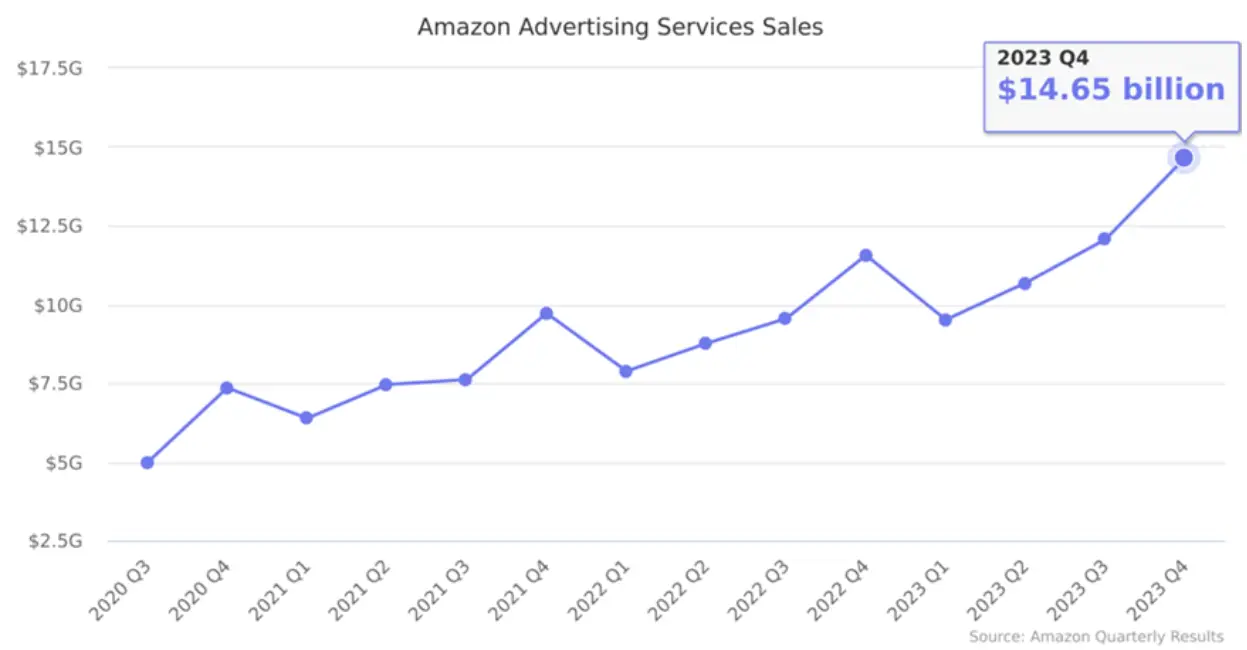
Amazon’s ad business (mostly driven by PPC ads like Sponsored Products) is now a tens-of-billions dollar segment[2], growing ~20% year-over-year. This reflects a simple reality: sellers are investing heavily in PPC because it drives results. To highlight how effective PPC can be, here are a few telling statistics and real-world signals:
-
Most Successful Sellers Use PPC: A large majority of Amazon sellers incorporate PPC in their strategy. According to a survey by Jungle Scout, about 75% of third-party Amazon sellers are running PPC ads[3]. Those who do advertise tend to achieve significantly higher sales. In fact, 44% of sellers using Amazon PPC report over $10,000 in monthly sales, compared to just 20% of non-PPC users. In other words, sellers who leverage PPC are more than twice as likely to break that $10k/month sales threshold, indicating that PPC can be a key driver of revenue growth. This doesn’t mean PPC alone guarantees success (product quality, price, reviews all matter), but it shows a strong correlation between advertising and higher sales performance.
-
High Conversion Power on Amazon: Shoppers on Amazon often have strong purchase intent, which makes PPC ads especially effective at converting clicks into sales. Industry data shows the average conversion rate on Amazon (for PPC ads) is around 10-15%, with an average about 11% in recent analyses. That means roughly 1 out of 9 clicks on a Sponsored Product ad leads to a purchase. To put that in perspective, the typical e-commerce website conversion rate is only about 1-2%. Amazon’s conversion rates are 5-10x higher. So advertising on Amazon often yields a strong ROI because the people clicking are ready to buy. An Amazon PPC ad is hitting shoppers at the bottom of the funnel (they’re already searching for the product), whereas Google or Facebook ads might catch people earlier in the buying process. This high conversion potential is a big part of why Amazon PPC is so popular and growing quickly – the ad spend can translate into real sales at a compelling rate.
-
PPC Boosts Organic Sales (TACoS concept): Beyond just the immediate ad sales, sellers see PPC as a way to drive organic growth. A metric called TACoS (Total Advertising Cost of Sales) looks at your ad spend as a percentage of total revenue (ad sales + organic sales). Many savvy sellers focus on TACoS because a healthy Amazon business leverages ads to spur overall sales, not just direct paid sales. For example, running PPC might lead to higher organic rankings, which then generate more organic (non-paid) sales. If your PPC spend is, say, 10% of your total sales and your total sales are growing, that’s generally a good sign – it means the ads are helping build your brand and product momentum beyond just the ads themselves. Studies and anecdotal evidence show that products heavily advertised in their launch phase often gain enough sales velocity and reviews to later sustain strong sales with lower ad spend. In short, PPC can have a flywheel effect: initial ad-driven sales -> improves organic rank -> organic sales increase -> need for ads at high spend diminishes for maintenance. This is why many experts say the goal of PPC is to eventually boost organic sales and why a slightly high ACoS early on isn’t necessarily bad if it’s building your rank and review base.
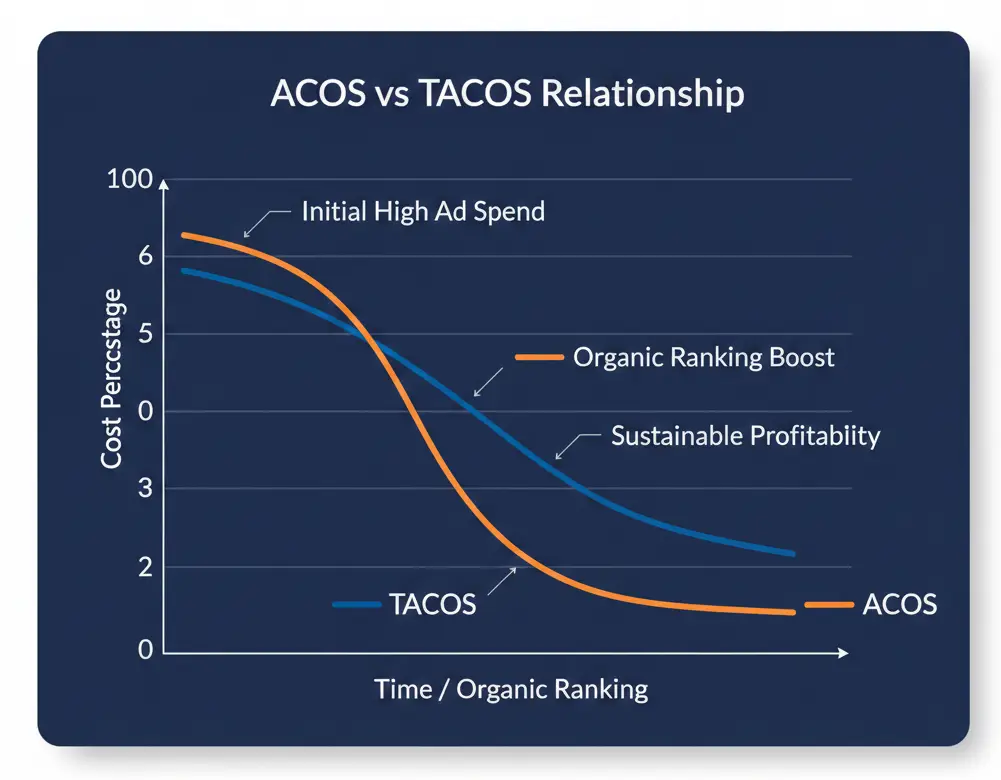
- Return on Investment Examples: Let’s consider a hypothetical but realistic scenario using some numbers. Suppose you spend $500 on PPC in a month. With an average CPC of $1, that’s about 500 clicks. If your conversion rate is 10%, those clicks yield 50 orders. If your product price is $30, that’s $1,500 in sales. Your direct ACoS would be $500/$1,500 = ~33%. Now, 33% ACoS might sound high (meaning you spent 33% of your sales on ads), but if those initial 50 sales improved your organic ranking and next month you got another 50 organic sales as a result, the picture changes.
Your total sales perhaps become $3,000 with $500 ad spend, and the TACoS is $500/$3,000 = ~16.7%. The organic sales in this example were indirectly driven by your ad investment. Many sellers see this kind of pattern: the first few months of PPC are an investment period with higher ACoS, which pays off in the form of a growing base of organic sales later. The exact numbers vary by product and market, but the principle holds: PPC is not just about immediate sales, but also about buying data and traction. Check out our guide on Amazon TACoS vs ACoS.
The data you get (which keywords convert, what bid yields best results) is invaluable for refining your approach, and the traction (sales velocity, reviews gained) is what pushes your business forward on Amazon.
In summary, the data and real-world results strongly support using Amazon PPC as a growth lever. The vast majority of successful sellers use it, and it has become almost a must-have in a competitive marketplace. While it requires an investment and careful optimization, the payoff can be substantial in both the short term (more sales) and long term (stronger organic presence). Sellers who avoid PPC often struggle to gain visibility – in fact, nearly 19% of Amazon sellers still don’t do any marketing, often due to lack of understanding or fear that PPC is too complex. But by not advertising, they may be missing out on the primary engine that could drive their product’s success.
The evidence is clear: done correctly, Amazon PPC can significantly amplify your reach and revenue.
Common Amazon PPC Mistakes and Misconceptions
Diving into Amazon PPC can be daunting for newcomers, and there are several common mistakes and myths that sellers should be aware of. Avoiding these pitfalls can save you money and accelerate your learning curve. Let’s debunk some misconceptions and highlight errors to avoid:
Expecting Instant Results (Myth: “I launched ads, why no sales on Day 1?”)
A frequent misconception is that Amazon PPC will immediately generate a ton of sales as soon as you start a campaign. In reality, PPC takes time and data to optimize. You might spend money for a few days (or weeks) before seeing a strong uptick in sales. Many beginners panic if an ad isn’t “profitable” in the first 48 hours and start changing things or turn it off. This is a mistake. As mentioned earlier, Amazon’s algorithm learns over time, and you need to gather enough click and conversion data to make informed adjustments. It’s crucial to set realistic expectations: the first few days of a campaign are often exploratory. Give it at least a week or two before making major changes. Think of PPC as planting seeds – you don’t get fruit the same day you plant. Patience and consistency are key; otherwise, you’ll never know what could have worked.
Not Optimizing the Product Listing (Mistake: Driving traffic to a weak listing)
This cannot be stressed enough: sending paid traffic to an unoptimized or unappealing listing is a recipe for wasted spend. Common errors include poor images, lackluster product descriptions, missing key details, or bad reviews and ratings. If shoppers click your ad but are turned off by what they see, they won’t buy. Your money is wasted on those clicks. Before running PPC, ensure your listing is attractive and keyword-optimized. High-quality images (including lifestyle images), a clear title with the main keywords, bullet points that sell benefits, and a competitive price are all essential.
Also, early on, gather some positive reviews if possible (through organic sales or programs like Vine) – a product with zero reviews might have a hard time converting ad traffic. The misconception some have is “the ad will do the work of selling.” In truth, the ad brings people to your page; your page still has to do the selling. PPC and listing optimization go hand-in-hand.
Overbidding and Overspending Too Fast (Mistake: Burning budget without strategy)
Another mistake is thinking that higher bids = guaranteed top placement = success. While bidding high can get your ad more visibility, it can also eat through your budget quickly without a guarantee of sales. Some new advertisers bid very aggressively on broad, popular keywords (“iphone case”, “coffee mug”) which can be extremely expensive and competitive, and they end up spending a lot for few results. It’s usually better to start with a moderate bid and see how your ads perform, then adjust.
Also, avoid throwing your entire budget at one campaign on day one. Start with an amount you’re comfortable learning with. It’s a learning phase, not just an earning phase initially. A smart approach is to bid and budget conservatively until you identify winning keywords/audiences, then scale up on those.
Remember, Amazon PPC is not about just getting clicks; it’s about getting profitable clicks. It’s better to have 10 clicks that yield 2 sales than 100 clicks that yield 1 sale. So don’t equate high spend with high reward – focus on targeted, relevant spend.
Ignoring Search Term Reports and Data (Mistake: Set-and-forget mindset)
Amazon provides valuable data on how your ads are doing, especially in manual campaigns and via reports for automatic campaigns. A big mistake is not reviewing this data regularly. The Search Term Report (for Sponsored Products) shows exactly what search queries shoppers used when they clicked your ad and whether those led to sales. This is a goldmine for optimization. For example, you might discover that your broad ad for “running shoes” got lots of clicks from the query “running shoes for flat feet”. If those converted well, that’s a cue to maybe add “running shoes for flat feet” as an exact keyword or even optimize your listing for it.
Conversely, you might find irrelevant searches that ate up spend – those terms should be added as negatives. Not analyzing these details is like flying blind. PPC shouldn’t be “fire and forget.” A misconception is that Amazon will automatically optimize everything – while Amazon’s algorithm does a good job with auto campaigns, the best results come when you as a human steer the campaign with insights from reports. Set a schedule (e.g., once a week) to pull your reports and update your campaigns accordingly.
Focusing Only on ACoS (%), Not the Bigger Picture (Myth: “ACoS must be super low or the ads are failing”)**
ACoS (Advertising Cost of Sales) is a key metric, but obsession over it can be misleading. New sellers often think a high ACoS (like 50-100%) means the campaign is a total failure and must be turned off. But context matters. If you’re in a launch phase or aiming to boost ranking, a high ACoS could be part of the strategy (essentially, you’re willing to break even or even lose a bit on ad sales because it’s fueling organic growth). TACoS (Total ACoS, ad spend as % of total sales) is a complementary metric that gives a bigger picture. If your PPC is 50% ACoS but your overall sales doubled and your organic sales grew, that might be okay for a period of time.
Of course, you can’t run unprofitable ads forever, but don’t kill a campaign solely because ACoS is high in early days. Look at trendlines: is ACoS coming down as you optimize? Is your overall business still benefiting? Another angle: some keywords will inevitably have higher ACoS but might be important for visibility (maybe your brand name, or a competitor’s name, etc.).
You might accept higher ACoS on those for strategic reasons. The myth is that PPC must always be profitable in isolation. In practice, PPC is part of a larger ecosystem of generating sales. Aim for profitability in the long run, but use ACoS wisely in context. Over-focusing on minimizing ACoS can also lead to under-spending – for example, pausing all keywords except a few cheap ones might give you a low ACoS but also severely limit your sales volume and growth. The goal is to find a balance that grows your business profitably, not just to brag about a low ACoS percentage.
Mixing Up Goals: Scaling vs. Optimizing at the Same Time
This point is more about strategy: there are two modes you can be in with PPC – scaling (growth) or optimizing (efficiency). Trying to do both simultaneously can lead to confusion. For instance, when launching or during a big sales season, you might decide to scale up: increase budgets, bid higher, test lots of new keywords, even tolerate a higher ACoS to grab market share and sales volume. That’s a scaling mindset. At other times, you might go into optimization mode: tighten bids, cut waste, focus only on proven keywords, and aim to lower ACoS and improve profitability. If you constantly flip-flop or do half of each, you may see poor results.
Tip: It can be useful to designate periods or campaigns separately – e.g., run one campaign as your “expansion” campaign to try new keywords (accept that ACoS might be higher there) and another as a “core” campaign with proven terms for efficient sales. Or allocate a certain time (a few weeks) to aggressive scaling, then follow with a period of optimization. The mistake is when a seller adds a bunch of new keywords (a scaling move) but simultaneously lowers all bids to reduce ACoS (an optimizing move) – the new keywords might not get any traction due to low bids, thus defeating the purpose. Clarity in your objective for each campaign/timeframe will yield better outcomes.
Misunderstanding How Ads Show (Myth: “Exact means only search, not product pages”) –
There are some technical quirks in Amazon PPC that can surprise sellers. One is how broad/phrase match campaigns can sometimes make your ad appear on product pages, or how product targeting ads can cause your product to show on searches indirectly. The myth is that choosing a certain match type or targeting strictly confines where your ad appears. In reality, Amazon’s algorithms might place your ads in various placements if it deems it relevant. For example, you might run an exact match campaign for “organic dog food” – you’d expect those ads only in search results for that term, but Amazon could also show your ad on some product detail pages for dog food due to relevance. Conversely, a product targeting campaign aimed at a competitor’s ASIN could sometimes surface your ad when people search generic terms related to that ASIN.
The takeaway here is not to be alarmed if you see impressions/clicks coming from places you didn’t expect – it’s how the system works to maximize exposure. The practical advice is: use negative targeting if needed to rein things in (e.g., if your broad campaign is showing up on a type of placement or irrelevant search that you don’t want, use negatives). And be aware that Amazon’s ad ecosystem is interconnected. This isn’t necessarily a “mistake” on the seller’s part, but it’s a misconception worth clarifying so you can better interpret your campaign performance and not jump to wrong conclusions about where your ads “should” or “shouldn’t” appear.
By recognizing these common mistakes and false beliefs, you can manage your Amazon PPC campaigns more effectively. In summary: be patient, make sure your fundamentals (listing quality) are solid, use data to guide changes, and have a clear strategy. Amazon PPC has a learning curve, but avoiding these pitfalls will save you money and get you to positive results faster. Remember, even seasoned sellers continuously learn and refine their tactics – so keep an experimental mindset.
Benefits of Amazon PPC for Sellers
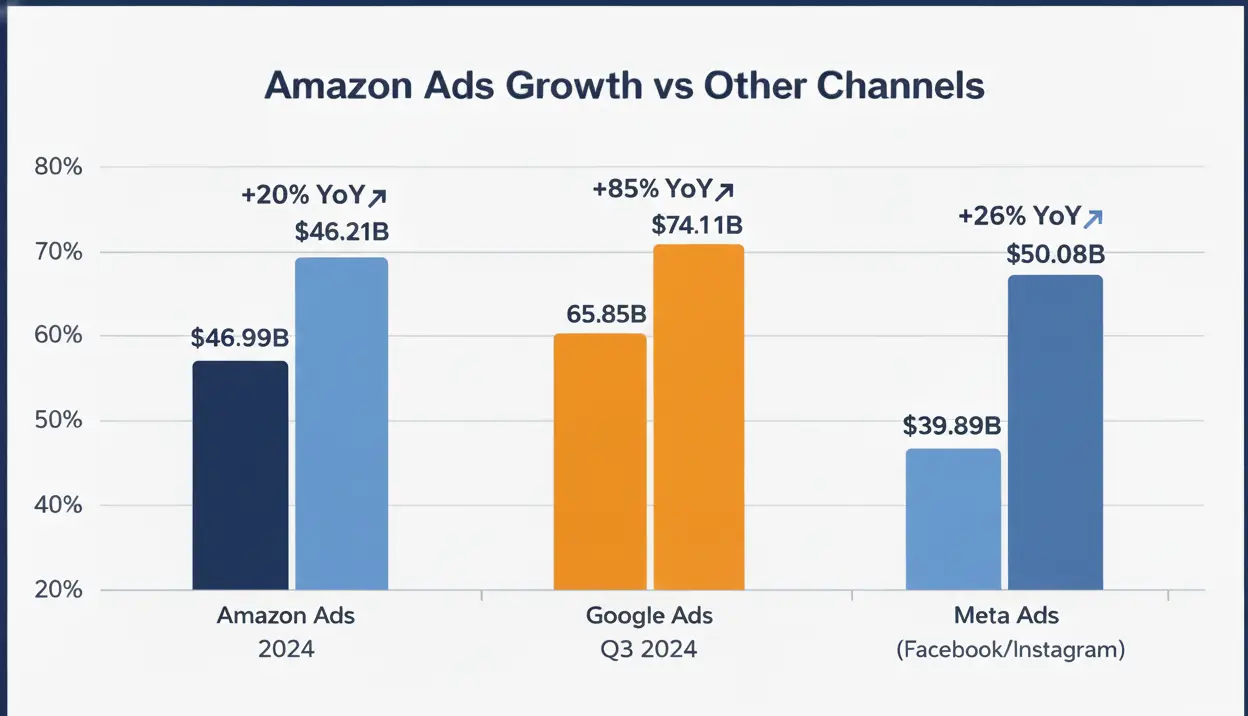
Digital advertising is undergoing a structural shift as brands move budgets closer to where purchasing decisions actually happen. Retail media networks - led by Amazon - are increasingly competing with traditional digital ad giants like Google and Meta for performance-driven spend. Understanding how Amazon Ads is growing relative to these established channels helps explain why advertisers are rethinking media mix strategies and prioritizing platforms with direct revenue attribution.
Immediate First-Page Visibility
Perhaps the biggest benefit of PPC is that it gives your products a shot at the coveted first page of search results from day one. Instead of waiting months to organically rank, you can pay to place your item where customers are actually looking.
This is invaluable for new products or competitive categories. You essentially skip the line and appear alongside top sellers for relevant searches. This immediate visibility means even a small brand can compete for shopper attention in a crowded market, as long as they’re willing to bid for it.
Higher Sales Volume and Revenue:
With increased visibility comes increased traffic, and with the right product and targeting, increased amazon traffic leads to more brand sales. Amazon PPC can significantly boost your sales volume. These are incremental sales you might not get otherwise. Importantly, PPC can help you capture high-intent buyers. For example, someone searching “buy portable phone charger” is likely ready to purchase – if your ad shows up and your product fits, you stand to gain a sale right away.
Over time, the additional sales driven by PPC can lead to higher overall revenue and even economies of scale for your business (e.g., more reviews, more customer feedback to improve your product, more capital to invest in inventory). Many businesses use PPC to fuel growth – it’s a lever you can pull to dial up sales when needed (for instance, during holidays or product launches).
Better Organic Ranking and Long-Term Growth
One often overlooked benefit of PPC is its halo effect on organic performance. Sales generated through PPC contribute to your product’s sales history and velocity. Amazon’s A9/A10 algorithm rewards products that sell well with better organic placement. So a successful PPC campaign doesn’t just get you paid sales; it can indirectly push your product up the organic rankings for your main keywords. As your organic ranking improves, you’ll start getting more organic (free) sales without ad spend.
This creates a virtuous cycle: PPC jumpstarts sales -> boosts organic rank -> organic sales increase -> lowers your dependence on PPC for those sales. In essence, PPC can be an investment in building your product’s reputation and rank on Amazon, which yields long-term benefits even if you later reduce ad spend. This is particularly beneficial for new product launches, where getting initial sales and reviews is critical.
Precise Targeting and Control
Amazon PPC gives you a high degree of control over who sees your product and when. You can target specific keywords, audiences, and even competitor listings. This means your marketing dollars are spent on reaching the customers most likely to buy. Unlike some traditional advertising (billboards, TV ads) where you pay to broadcast to a huge audience hoping the right people are among them, PPC is highly targeted. If you sell a niche item, you can target the exact search terms that niche audience uses.
You can also control your spend down to the keyword level – allocating more budget to top performers and cutting spend on poor performers. This level of control means greater efficiency: you can optimize for the best ROI continuously. Additionally, you have flexibility – you can scale up during peak seasons or dial down during slow periods, turn campaigns on/off, and test new approaches quickly. It’s a dynamic tool at your disposal.
Measurable Results and Data Insights
Another benefit of PPC on Amazon is the wealth of data and analytics it provides. Every click, impression, and sale is tracked. You can clearly see how much you spent and what you got in return. This measurability is a boon for decision-making. You can calculate metrics like cost per acquisition, break-even ACoS, etc., and make informed budget decisions. Moreover, the data from PPC campaigns offers market insights. You learn which keywords customers use to find your type of product, which features or angles resonate (based on which ads/keywords convert), and even pricing feedback (if lots of clicks but no sales, maybe your price is an issue). Use dynamic pricing for marketplace to drive up profitability.
This information can inform not just your ads but your overall marketing strategy, SEO optimization, and even product development. In short, Amazon PPC acts like a continuous market research tool while also generating sales – it tells you what your customers want by showing you what they click and buy.
Competitive Advantage and Brand Defense
If you’re in a competitive category, PPC can be a way to outmaneuver competitors. By bidding on certain keywords or targeting competitor product pages, you can capture market share. For example, if you have a new vacuum cleaner brand, you might run ads on the search for “Dyson vacuum” (a famous brand). If your product is compelling and cheaper, you might peel away some of those customers. Additionally, PPC enables brand defense – you can bid on your own brand name keywords or advertise on your own product pages (via Sponsored Brands or Display) to prevent competitors from stealing those spots.
There’s nothing worse for a brand than a shopper searching your brand and seeing a competitor’s sponsored ad first. With PPC, you can guard against that by occupying prime real estate for your brand terms. Essentially, if you’re not advertising, chances are your competitors are – and you could be losing visibility and sales to them. Using PPC ensures you’re in the game and not leaving opportunities on the table for others to grab.
Scalability and Growth Potential
Finally, a big benefit of Amazon PPC is that it’s scalable. Once you find campaigns that work well, you can increase budgets to drive even more sales almost linearly (up to a point). If you have the inventory and can maintain margins, you can really grow your business by scaling up ad spend on profitable campaigns. Some seven-figure Amazon sellers attribute a huge part of their growth to scaling PPC effectively – they treat it as an investment, continually optimizing and increasing spend where it makes sense. Additionally, as you expand your product line or launch new products, the skills and data you gained from one PPC campaign can be transferred to others.
Over time, you build a portfolio of campaigns that collectively bring in a significant portion of your revenue. In essence, mastering PPC gives you a lever for growth – you can turn it up to boost sales or fine-tune it to maintain profitability, depending on your business goals. It’s hard to achieve that kind of agile, responsive control through organic tactics alone (which are slower and less predictable).
In summary, Amazon PPC offers a range of benefits: from the immediate (getting your product seen and sold) to the strategic (informing your broader business decisions and improving organic position). It’s a tool that, when used well, can transform an Amazon business from stagnating to thriving. Yes, it involves cost and continuous management, but for most serious sellers, the benefits far outweigh the costs. In today’s Amazon marketplace, PPC is not just an optional add-on – it’s often a fundamental part of being competitive and maximizing your success as a seller.
GrowthJockey: Validating and Scaling Ventures with Data-Driven Precision
In the journey of building and growing a business – whether it’s an Amazon venture or a new tech startup – having the right partner can make all the difference. This is where GrowthJockey comes in. GrowthJockey helps companies validate, build, and scale new ventures with a rigorously data-driven and AI-powered approach. Rather than relying on guesswork or assumptions, GrowthJockey employs AI-driven venture architecture and systematic experimentation to test what really resonates with your market. They understand that true product-market fit and scalable growth come from listening to user intent and market signals – the same way an Amazon PPC campaign provides feedback on what customers want, GrowthJockey provides a structured framework to interpret customer needs and behaviors across any venture.
With deep experience and expertise in launching and growing dozens of businesses across industries, GrowthJockey acts as a hands-on partner (a venture builder) that focuses on outcomes. The team brings authority and trust by contracting on real results – they emphasize metrics like revenue growth, user acquisition, and retention rather than vanity metrics. This means they care about experiments and strategies that truly move the needle. GrowthJockey’s approach is holistic: from leveraging AI and machine learning to analyze market data, to designing rapid experiments that validate ideas with real users, to crafting growth strategies that can scale profitably.
They essentially de-risk the innovation process for companies. Whether you’re a large enterprise incubating a new idea or a startup ready to scale, GrowthJockey provides the architectural guidance and growth execution muscle to accelerate your journey. They will help you rigorously test hypotheses (What messaging attracts the right customers? Which channels yield the best ROI? Where does the market demand truly lie?) and then double down on what works – much like optimizing a campaign, but on a venture scale.
In an environment where experience and trustworthiness are key, GrowthJockey stands out by bringing both cutting-edge AI tools and battle-tested human expertise to the table. By partnering with GrowthJockey, companies ensure that their ventures are built on a solid foundation of validated learning, robust experimentation, and strategic growth planning. In short, GrowthJockey is not just an advisor – we become co-architects of growth, aligning their success with yours and guiding you through the complex journey of turning a promising idea into a scalable, successful business.
FAQs on Amazon PPC
Q1: What is Amazon PPC?
Amazon PPC (Pay-Per-Click) is Amazon’s advertising system where sellers pay only when a shopper clicks their ad. You bid on keywords or products, and winning ads appear in search results or product pages. It’s a way to buy visibility and drive traffic to your listings. Impressions are free; charges apply only per click.
Q2. Is PPC better than SEO?
PPC and SEO serve different goals and work best together. PPC delivers immediate visibility and sales, while SEO builds long-term organic traffic. On Amazon, PPC can even boost SEO by increasing sales velocity. The most effective strategy is PPC for speed + SEO for sustainability.
Q3. How do I calculate CPC in Amazon PPC?
CPC (Cost Per Click) is calculated by Amazon through an auction - you pay slightly more than the next highest bidder. You don’t set CPC directly; you set a maximum bid, and Amazon determines the actual cost. Your average CPC = Total Spend ÷ Total Clicks, shown in campaign reports.
Q4: How do I set up a PPC campaign on Amazon?
Go to Seller Central → Advertising → Campaign Manager and click Create Campaign. Choose an ad type (usually Sponsored Products), set a budget, select automatic or manual targeting, add your product, and set bids. Launch the campaign and monitor performance in Campaign Manager.








Industries
Growth
Operations
Technology