
Clawdbot (Moltbot) Tutorial: Self-Hosted AI Assistant with Local Memory & Automation
Clawdbot (also spelled ClawdBot, recently renamed Moltbot) is a cutting‑edge open‑source AI assistant you run entirely on your own hardware. Unlike cloud-based chatbots, Clawdbot keeps all your data local – messages, files, and memories stay on your device. You interact with it through familiar messaging apps (WhatsApp, Telegram, Discord, Slack, etc.) or directly via terminal, and it proactively does things for you – from sending emails and managing your calendar to automating browser tasks or home devices. In short, Clawdbot is "an AI that actually does things", not just chit-chat. Its modular design (Gateway + Agent + Skills + Memory) makes it a versatile personal "digital coworker", with persistent memory and extensibility far beyond a typical chatbot.
What is Clawdbot?
Clawdbot is a self-hosted AI assistant, living on your computer (Windows, macOS, Linux, even a Mac mini or Raspberry Pi). It connects to chat platforms you already use (WhatsApp, Telegram, Discord, Slack, Signal, iMessage, Microsoft Teams, etc.). You can text it like a colleague, and it replies and takes action on your behalf. All your conversations, preferences, and automations stay on your device – no third‑party servers or hidden data collection.
Key features include:
-
Local & Secure: Runs on your hardware (PC, Mac, VPS). Data (conversations, files, logs) are stored locally, giving you full privacy and control.
-
Multi‑Channel Messaging: Use any chat app. Message the same assistant on WhatsApp, Telegram, Discord, Slack, Signal, iMessage, Teams, or WebChat – and it keeps the context across platforms. Your conversation stays in sync everywhere.
-
Persistent Memory: Clawdbot never forgets. It keeps a searchable history of chats, notes, and context on your disk. Tell it your preferences or tasks, and next time it'll remember them.
-
Task Automation: Beyond chat, Clawdbot can do things: run shell commands, control your browser, handle files, emails, calendars, or smart home devices. Its "skills" system (ClawdHub) lets it plug into Gmail, Todoist, GitHub, trading APIs, IoT, and much more.
-
Proactive Alerts: It can "reach out" to you. Schedule morning briefings, reminders, stock or weather alerts, or periodic tasks. It uses cron/webhook triggers for background tasks, turning it into a "colleague who keeps you informed".
-
Extensible & Open: Clawdbot is highly customizable. Developers can write new skills in JavaScript/TypeScript or any CLI script. The ClawdHub marketplace (online registry) offers hundreds of community skills (voice, translations, integrations) you install with one command.
-
Model‑Agnostic: You choose the AI "brain." Clawdbot works with Claude (Anthropic), GPT-4/3.5 (OpenAI), Google's Gemini, local models (via LM Studio or Docker Model Runner), and more. This flexibility lets you balance cost vs power.
In summary, Clawdbot is a "personal AI assistant on any platform": always-on, memory-empowered, and capable of real action. For developers, it's an agentic platform that bridges chat interfaces, code execution, and automation into one open system.
Clawdbot Architecture
At a high level, Clawdbot has four main components (often called the Gateway architecture) that work together:
-
Gateway (Daemon): A persistent background service (user‐level systemd or launchd) that manages messaging connections, scheduling, and the overall control plane. It listens for your inputs on all connected channels (WhatsApp, Telegram, Discord, Slack, Signal, iMessage, CLI, etc.) and orchestrates the rest of the system.
-
Agent Runtime ("Pi"): The AI "brain" that communicates with model APIs. When you send a message, the Gateway passes it to an embedded coding agent (nicknamed Pi). Pi can run shell commands or scripts locally based on model instructions. It sends prompts to your chosen LLM (e.g. Claude, GPT-4, a local LLM) and executes the returned instructions on your machine.
-
Skill Extensions: Plug‑ins that give the agent new abilities (like hands). Skills include automation scripts, web search, email, GitHub, calendar, smart home control, etc. These are defined by SKILL.md files (using the AgentSkills YAML format) and optionally helper code. When Pi identifies a skill relevant to your request, it follows that skill's step-by-step instructions instead of generating code from scratch.
-
Memory & Storage: A local file‑based memory system stores all conversation history, notes, task lists, and user data. Think Markdown files or a lightweight database under the hood. You own the memory – nothing opaque or cloud‑hosted. You can even version-control or grep through it.
flowchart LR
  A[User Chat (WhatsApp/Telegram/Discord/...)] -->|message| G[Gateway]
  G --> R[Agent (Pi)]
  R -->|LLM call| LLM[Model Provider (Claude, OpenAI, Local LLM...)]
  LLM --> R
  R -->|executes| C[Computer (Terminal/Browser/Web)]
  C --> R
  R --> G
  G --> A
The diagram above illustrates the message flow: your chat message → Gateway → Agent → Model API → Agent → executes actions → Gateway → chat. This "always-on" Gateway means Clawdbot listens constantly (even when you're not actively chatting). For example, Clawdbot can wake you up with a morning briefing or alert you if your monitored stock drops, all thanks to its scheduling and proactive engine.
The Gateway also hosts a local web dashboard (config UI) and logging. It runs as a system service (launchd on macOS, systemd on Linux) so it can restart automatically. The Agent (Pi) supports multiple models: you configure providers in a config.json (or via the wizard) to use any number of LLMs. Clawdbot even supports on‑prem models via Docker (see below) for a "cloud‑free" setup.
Safety & Permissions: The "Human-in-the-Loop"
Giving an AI access to your computer sounds risky and it can be. That is why Moltbot operates on a "Permission First" basis, often called the Lobster Protocol. Which is another version of human-in-the-loop.
-
Safe Mode by Default: When you ask Moltbot to perform a sensitive action (like deleting files, sending money, or executing a shell script), it pauses.
-
User Approval: It sends you a preview of the command it intends to run (e.g.,
rm -rf /documents/old_logs). It will only proceed if you reply with "Approved" or "Yes." -
Granular Control: In your config file, you can whitelist "safe" skills (like Spotify or Calendar) to run automatically, while keeping "dangerous" skills (like Terminal or Browser Control) behind an approval gate. You are the pilot; Moltbot is just the co-pilot.
Key Features and Capabilities
Clawdbot's standout features make it far more than a chatbot:
-
Self‑Hosted Privacy: All computation and data live on your hardware. You decide which files, apps, or networks it can access. By default, it's sandboxed (Docker isolation is recommended). There are no hidden cloud servers snooping on your data.
-
Persistent Memory: Unlike ChatGPT or Siri, Clawdbot remembers. Every conversation snippet and personal detail you share is saved in your private memory store. This means no more repeating context each session. One user built a "second brain" tracking family schedules and health data locally.
-
Multi‑Platform Presence: It gives you one "brain" across all your chats. Message it on WhatsApp while walking, then continue on Telegram from your PC – it's the same thread. The state and history sync everywhere.
-
Full System Access: Clawdbot can interact with your computer as you would. It can run shell commands, manipulate files, automate GUI tasks via a headless browser, and control APIs. For example, users have had Clawdbot search the web for a car, interact with dealer sites and emails, and negotiate a price – saving $4,200. (Security note: This power is great only if used cautiously. Never run Clawdbot with unlimited access on a machine with sensitive data unless you sandbox its actions.)
-
Proactive Alerts & Automation: It can reach out on its own schedule. Think morning routines: each day it can ping you with a summary of calendar events, tasks, and news. Or watch a stock ticker and alert you if a threshold is crossed. Clawdbot's scheduling engine (cron jobs, webhooks) makes this easy.
-
Extensible "Skills" System: Clawdbot includes a built-in ClawdHub marketplace. Non-technical users can browse and install skills (e.g. Gmail cleanup, Notion sync, trading helpers) with a single command. Developers can write custom skills by creating a SKILL.md (YAML front-matter plus instructions) – these plug-ins give Clawdbot "hands" to new tools. Skills follow the open AgentSkills spec (the same format used by Claude Code, Cursor, etc.), so a skill you write will work in any Agents-compatible environment. For example:
---
name: spotify-control
description: Control music playback on the local machine.
metadata: {"moltbot":{"requires":{"bins":["spotify-cli"]}}}
---
instructions: |
  To play music, use the command `spotify play <song_name>`.
  To pause, use `spotify pause`.
  If the user asks for "something focus-friendly," search for Lo-Fi playlists.
The above frontmatter (from a simple Spotify skill) tells the agent: "I know how to handle music." Now, if you text Clawdbot "Play some jazz," it recognizes the intent, checks the instructions, and executes the CLI command automatically. When loaded, the skill's instructions allow Clawdbot to run commands to manage playback. This makes Clawdbot infinitely customizable by community contributions.
- Flexible Model Support: You pick the LLMs and mix them. Clawdbot works with Claude (Anthropic), OpenAI (GPT-4/3.5), Google Gemini, or any model API. You can even plug in local models (via Docker Model Runner or LM Studio) to avoid API calls. For instance, you might use a high-power Claude Opus for deep reasoning and a fast, cheap model for simple tasks. The agent supports model rotation and failover, so if one model is busy or pricey, it switches to another.
Collectively, these capabilities mean Clawdbot "feels like an AI colleague who keeps working even when you sleep".
Installation and Setup
Getting started with Clawdbot involves a few steps. It assumes some technical comfort (terminal usage, API keys, etc.) – it's not a one-click consumer app. But the process is streamlined by an interactive CLI wizard. Here's a high-level guide:
1. Prerequisites:
- A machine or server (Windows with WSL2, macOS, or Linux). Many users dedicate a Mac mini or small Linux box (even a cheap VPS) to run Clawdbot.
- Node.js ≥ 22 (auto-installed by Clawdbot's script if missing).
- Messaging channel accounts (e.g. Telegram bot token, WhatsApp account).
- API credentials for LLMs: e.g. an Anthropic Claude Pro/Max subscription or OpenAI keys. (If you have Claude Code/CLI, you can generate a one-year setup token.)
Hardware Compatibility Cheatsheet
Before installing, check which setup fits your hardware. You don't need a supercomputer if you are using Cloud APIs!
| Setup Type | Recommended Hardware | Best For |
|---|---|---|
| Cloud Mode (Claude/OpenAI) | Minimal: Raspberry Pi 4/5, any VPS (1 vCPU, 2GB RAM). | Always-on assistants, low power bills, high-intelligence tasks. |
| Hybrid Mode (Cloud + Local Tools) | Standard: Mac Mini (M1/M2), Intel NUC, or Laptop (8GB RAM). | Heavy automation (browser tasks), running many "skills" at once. |
| Fully Local Mode (Local LLMs) | Performance: Mac Studio (M3/M4) or PC with NVIDIA GPU (16GB+ VRAM). | Privacy purists. Runs models like Llama-3 or Mixtral entirely offline. |
2. Install Clawdbot (Moltbot) CLI:
Open a terminal/PowerShell and run the installer. You have two main installation paths. Choose the one that matches your comfort level:
-
Option A: The Secure Path (Recommended): Use Docker. This keeps Moltbot inside a container, ensuring it can't accidentally delete system files or mess with your OS settings outside its sandbox.
curl -fsSL https://molt.bot/docker-setup.sh | bash -
Option B: The Direct Path (for Developers): Installs directly onto your metal via NPM. This is faster and gives the bot full control over your machine ideal for power users who want the bot to manage system updates or file organization.
curl -fsSL https://molt.bot/install.sh | bash
This detects your OS, installs Node 22+ if needed, and installs the moltbot CLI globally. (If curl fails, you can also do npm install -g moltbot@latest.)
3. Onboarding Wizard:
After installation, run the wizard with:
moltbot onboard --install-daemon
The --install-daemon flag tells it to set up the Gateway service (launchd/systemd) so Clawdbot runs 24/7. The wizard then walks you through key choices:
- Environment: Choose "local" (single-machine) or "remote" (if connecting to a separate gateway). Most users pick local.
- Authentication: Enter your Claude or OpenAI API keys (or use OAuth). If you have a Claude Code token, paste it here.
- Model Selection: Pick default models for tasks. The wizard may suggest Claude Opus or Gemini Pro/Max for best results, but you can swap in any models.
- Channels: Choose which messaging channels to connect. For example, select WhatsApp and scan the QR code (via Settings → Linked Devices in WhatsApp on your phone). You can also connect Telegram (create a bot via BotFather and paste its token), Discord (use a bot token), Slack, Signal, iMessage, etc. Clawdbot supports them all.
- Daemon Setup: Confirm installing Clawdbot as a system service so the Gateway stays running.
- Optional – Skills/Integrations: The wizard can optionally set up certain skills or hooks. You may skip this initially and add integrations later (they require extra tooling or credentials).
Once the wizard finishes, the Gateway service is active and you can start chatting with your new AI agent. Try sending a test message to yourself ("Hello, Clawdbot?") via the connected channel – the query and Clawdbot's response should appear across your phone and the terminal/web UI.
4. First Run Example:
As a sanity check, run a simple Clawdbot command from the terminal:
moltbot gateway --port 18789 --verbose   # Starts Gateway manually (usually auto-launched)
moltbot agent --message "Ship checklist" --thinking high
You should see the assistant responding in the terminal.
5. Updating:
To update Clawdbot, use npm or the script again (e.g. npm install -g moltbot@latest) and restart. You can also run moltbot doctor to check configuration health and apply fixes.
Docker Setup: Clawdbot can run inside Docker, which eases sandboxing and deployment. There is an official Docker setup (see the docs and docker-setup.sh). You can also use Docker Model Runner to host local LLMs. For example, by configuring Clawdbot's config.json to point to a DMR server (see below), you offload all AI inference to your local Docker container. The Docker approach ensures your tools execute in isolated containers, adding security.
GitHub and Source Code: Clawdbot (Moltbot) is open-source under the MIT License. The official repo is at github.com/moltbot/moltbot (a fork/renamed from clawdbot/clawdbot). You can clone and build from source if you like:
git clone https://github.com/moltbot/moltbot.git
pnpm install && pnpm build   # or use npm/pnpm to install
Having the code available means you can inspect everything or modify it. (A legacy alias clawdbot still works as a command for compatibility.)
Clawdbot on Docker (Docker Model Runner)
For advanced users, Clawdbot can run entirely in containers with local models via Docker Model Runner (DMR). This avoids sending any data to cloud AI providers. The Docker combination works like this: you run a DMR instance hosting large language models (as Docker images). Clawdbot is configured to use DMR's OpenAI-compatible API endpoint as its LLM provider.
-
Benefits: Full privacy (data never leaves your machines), no per-token fees once models are pulled, GPU/CPU scaling, and sandboxing.
-
Setup: Install Docker and Docker Model Runner. In Clawdbot's ~/.config/moltbot/config.json, add a provider entry pointing to your DMR server, e.g.:
"models": {
  "providers": {
    "dmr": {
      "baseUrl": "http://localhost:12434/v1",
      "apiKey": "dmr-local",
      "api": "openai-completions",
      "models": [
        { "id": "gpt-oss:128K", "name": "gpt-oss (128K context)", ... },
        { "id": "glm-4.7-flash:128K", "name": "glm-4.7-flash (128K)", ... }
      ]
    }
  },
  "agents": {
    "defaults": {
      "model": { "primary": "dmr/gpt-oss:128K" }
    }
  }
}
This tells Clawdbot to send all requests to http://localhost:12434/v1 (DMR) instead of cloud APIs. Now your assistant's "brain" is fully on-prem.
- Security: The Docker path enforces strong isolation. Models run in containers, limiting system access. Only the required "skill" containers mount needed directories.
Messaging Integrations
Clawdbot plays well with all major chat platforms. During setup, you connect the channels you use, for example:
-
WhatsApp / Telegram: Supported out of the box via the Gateway. For WhatsApp, the wizard uses the Web/QR login. For Telegram, you create a bot and give its token. Once connected, you simply message your personal AI from any chat.
-
Discord / Slack: You can invite Clawdbot's bot to your server or workspace. The setup wizard prompts for a Discord bot token (from the Discord Developer Portal) and configures permissions. After linking, chatting with the bot (via DM or channel) goes through Clawdbot. (Clawdbot even supports Discord's Gateway Mode for presence.) The official docs detail the process.
-
Signal / iMessage: Signal works via an Android device link or signal-cli. iMessage integration requires a Mac with accounts configured.
-
Slack / Microsoft Teams: Supported (Slack via Socket Mode, Teams via Graph API).
Once connected, Clawdbot appears as your assistant in those apps. You can even have multiple "agents" in one server (e.g. clone your assistant). In practice, many users run Clawdbot in a dedicated Discord server as a hub for personal agents. (One user even had Clawdbot open PRs in Discord with test results.)
Skills and Extensibility
Clawdbot's skill system is one of its most powerful features. It allows any repetitive workflow to be scripted and invoked naturally.
-
ClawdHub (Skill Marketplace): An online registry (ClawdHub) hosts community skills. Users can browse and install skills like "Check Email", "Slack Standup", "Home IoT Control", etc., with a simple command like moltbot skill install gmail. Each skill package includes a SKILL.md and any scripts or configs. The installation is transparent; after a moment, Clawdbot can use the new ability immediately.
-
Custom Skills: Developers write skills in Markdown+YAML (AgentSkills format). A skill directory might look like:
skills/
  my_skill/
    SKILL.md
    helper.sh
The SKILL.md has YAML frontmatter (name, description, requires, etc.) and then instructions. For example, a Gmail tidying skill might list steps to log in and delete spam. When Clawdbot detects a user intent matching that skill, it follows the scripted steps.
-
AgentSkills Standard: Clawdbot adopted the AgentSkills spec (by Anthropic), which is used by Claude Code, Cursor, OpenAI Codex, Gemini CLI, and others. This means skills you write for Clawdbot are portable across many AI agent platforms. Skills can specify dependencies (binaries, env vars) in metadata. If unmet, the skill stays dormant until installed.
-
Examples: Popular built-in skills include GitHub (interact via gh CLI), Google Search, Gmail/CALENDAR, file browser, SQL tools, and even hardware controls. Skills can be as powerful as you make them – some users have taught Clawdbot to orchestrate entire DevOps pipelines or creative workflows by chaining skills.
-
Writing Skills: To create a new skill, you write a SKILL.md file with frontmatter and prose instructions. The frontmatter might be:
---
name: send-email
description: Send an email via Gmail API.
metadata: {"moltbot":{"requires":{"bins":["curl"],"env":["GMAIL_API_KEY"]}}}
---
Then you outline the steps (in plain text). The Clawdbot agent will parse this and execute commands under the hood. (See AgentSkills docs for full syntax.) In essence, skills "teach" the agent how to perform a task, so it doesn't have to figure it out each time.
The extensibility is why Clawdbot has a growing community. Users continuously build and share new skills (often without writing code themselves!), and Clawdbot ships with dozens out of the box. Because of this, power users often dedicate hardware just to run Clawdbot, turning it into a general-purpose personal automation server.
Real-World Use Cases
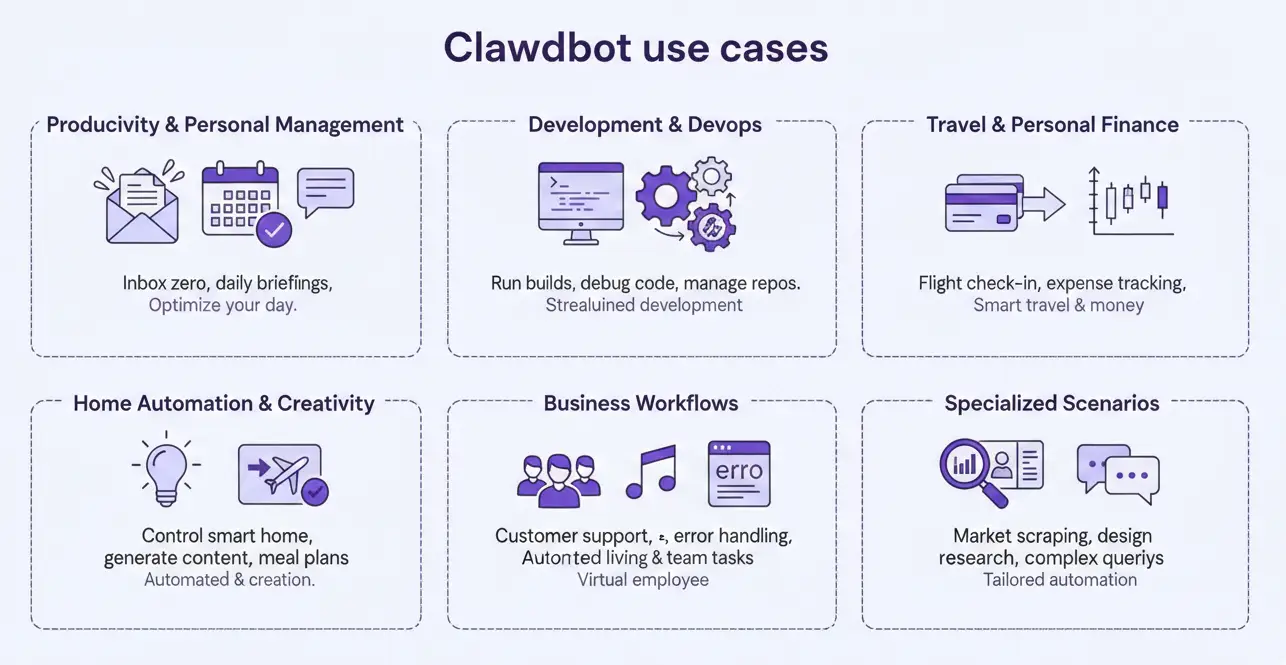
Clawdbot's flexibility means it can automate almost anything on your computer or online accounts. Some illustrative use cases:
-
Productivity & Personal Management: Auto-clearing your inbox ("Unsubscribe from newsletters"), summarizing unread emails, drafting replies, scheduling meetings, or generating daily briefings from calendar/tasks. One user had Clawdbot do an "Inbox Zero" sweep and draft replies, another automated daily health and news summaries.
-
Development & DevOps: Run build scripts, debug code, or manage repos by chat. For example, send an error log to Clawdbot and it updates the code with fixes. Or instruct it to commit, push, open a pull request, and even merge changes – all via text. It can monitor CI/CD pipelines, triage GitHub issues, or run Sentry monitors to auto-fix bugs.
-
Travel & Personal Finance: Monitor flight check-ins, book tickets, track expenses. A common skill is "travel agent": Clawdbot can search flights, auto-check you into flights (via web automation), and remind you to pack. It can watch stock/crypto prices and alert you or even execute trades (with your OK). It can also connected to Universal Commerce Protcol for shopping related tasks.
-
Home Automation & Creativity: Control smart home gadgets (lights, thermostat, music) via voice or chat, using skills for IoT. Creative tasks like content generation (blog drafts, images, music) can be done by calling external AI tools through Clawdbot. One example: a family agent that plans weekly meals by pulling recipes, adjusting for dietary needs, and sending a shopping list to your phone.
-
Business Workflows: Small teams use Clawdbot as a "virtual employee." It can monitor error logs, open GitHub PRs for fixes, handle routine customer support queries on Slack/Discord, or integrate with services like Zendesk. (For large enterprises, Clawdbot may need more governance, but for personal/small team use, it's very effective.)
-
Specialized Scenarios: Traders use it to watch DeFi markets (via web scraping and APIs) and auto-report opportunities. Designers might use it to scrape design websites for inspiration and feed results into prototyping tools. One user had Clawdbot interview the Lemonade Insurance chatbot on their behalf to get a better payout on a claim.
In all these cases, the common thread is conversational AI automation. Users don't write code; they simply describe a task in chat, and Clawdbot performs it by coordinating its skills and tools. The Clawdbot showcase page is "wild" – people have built complex pipelines (e.g. content generation + social posting) entirely by chatting.
Tips, Tricks, and Best Practices
To get the most out of Clawdbot (and stay safe), consider these expert tips:
-
Security First: By design, Clawdbot can control your system, so harden your setup. Always run Clawdbot on dedicated or non-critical hardware (e.g. a tucked-away Mac mini or cheap VPS), never on your main workstation.
-
Sandbox Tools: Use Docker or internal sandboxing for risky tools (e.g. browser.open). Clawdbot's official docs recommend that tools run in restricted containers with minimal filesystem access. The Gateway (daemon) itself can remain bare-metal, but any shell commands or external skills should be sandboxed or permissioned.
-
Least Privilege Agents: Create separate agents for different roles. For example, give one agent your email and calendar permissions, and another (isolated) agent for financial accounts. This way, a bug or bug-exploit in a trading agent doesn't compromise your Gmail.
-
Network Protection: Bind Clawdbot's Gateway to localhost (loopback) so it's not exposed to the wider network. For remote access, use a VPN or tunnels (e.g. Tailscale or Cloudflare Tunnel) rather than open ports.
-
Approval Workflows: For dangerous operations (e.g. sending money, deleting files), use Lobster approval checkpoints. Design your workflows so Clawdbot shows you a preview before executing final actions. Start by doing low-risk tasks first – mail summaries, research, etc. before letting it loose on sensitive APIs.
-
Keep Backup & Monitor: Regularly back up ~/.moltbot/ (the workspace) so you don't lose memory/history. Use moltbot doctor to check for config issues or security notices. Monitor API token usage (check your Claude/OpenAI dashboards); complex tasks with large context can burn through tokens quickly.
-
Performance Tuning: On hardware: a small always-on computer (e.g. Mac mini, Raspberry Pi 5, or Intel NUC) works well. More RAM/CPU lets Clawdbot handle multiple agents systems. For models: assign Claude Opus or Gemini Ultra to heavy reasoning tasks, and reserve faster, cheaper models (Claude Sonnet/Gemini 1.0 or local) for routine queries. Enable model failover so if one API times out, Clawdbot tries another.
-
Prompt Engineering: Use natural language! Clawdbot is designed for free-form chat. However, you can tweak its behavior with tags. For instance, appending --thinking high (or /think high) asks for deeper, more elaborate answers. Similarly, using --thinking low or --fast can speed up responses with shorter answers.
-
Custom Personalities: Edit SOUL.md in your workspace to shape Clawdbot's persona (e.g. cheerful, concise, professional). It will carry through to its responses. Similarly, you can write onboarding notes in the config to introduce the assistant's role.
-
Clawdbot Doctor: Periodically run moltbot doctor to audit your setup. It can spot misconfigurations, outdated CLI versions, or security concerns. Follow any recommendations it gives (e.g. regenerate tokens if leaked).
-
Stay Updated: Clawdbot is under rapid development. Keep an eye on the GitHub releases or use npm update. The active community also produces updated skills and fixes.
By following these practices (especially sandboxing and least privilege), you can enjoy Clawdbot's power without undue risk.
Clawdbot vs. Other AI Assistants
Clawdbot represents a distinct category of AI assistant. Here's how it compares:
| Feature | Clawdbot (Moltbot) | Cloud Chatbots (e.g. ChatGPT, Claude) | Traditional Assistants (Siri/Google) |
|---|---|---|---|
| Hosting | Self‑hosted on your hardware | Cloud only (OpenAI/Anthropic servers) | Cloud-based (Apple/Google servers) |
| Data Privacy | Local only – you control all data | Data routed through provider (unless special on-prem versions) | Data on company's cloud |
| Memory | Persistent long-term memory on disk | Short context window; forgets session context between conversations | Forget current context on close |
| Multi‑Channel | Integrates with chat apps (WhatsApp, Discord, etc.) | Web UI or API only (no built‑in chat platform integration) | Limited to device OS/app only |
| Task Automation | Can run scripts, access system files, control browser – real actions | Restricted: cannot directly access your system or files | Very limited (e.g. simple voice commands) |
| Proactiveness | Proactive alerts, cron jobs, reminders | Reactive only – waits for user prompt | Limited to OS-scheduled events |
| Customization | Highly extensible (write skills, plugins) | Custom "GPTs" can be made, but no file or process access | Fixed capabilities, no user plugins |
| Cost Model | Free MIT code; pay for your own compute and API usage | Subscription-based (ChatGPT Plus) or pay-per-use API | Free with device (data cost to company) |
| Ease of Setup | Requires tech comfort (setup wizard, terminal) | Easy (just visit a website) | Easy (built in on devices) |
| Use Cases | Personal productivity, dev automation, custom workflows | General Q&A, creative tasks, coding help | Simple assistants (alarms, info) |
Clawdbot is not trying to be an out-of-the-box consumer assistant. Instead, it's an agentic AI platform: you essentially get a remote-controlled "computer on call". If you value control, privacy, and real task automation, Clawdbot delivers capabilities that cloud assistants can't match (since those don't have access to your files or apps). For example, no cloud chatbot can browse your local file system or schedule cron jobs for you.
By comparison, Claude AI (Anthropic) or ChatGPT offer powerful models but confined to text. Clawdbot fits into the "AI Agents" category – think of it as a personal AI OS. Other tools like OpenAI's AgentKit or web-based agents exist, but Clawdbot's self-hosted nature and persistence make it unique.
Pricing and Cost
One common question: Is Clawdbot free? The answer: Yes – the software itself is MIT-licensed and free. There are no subscription fees for Clawdbot. All costs come from:
-
Infrastructure: Running Clawdbot on hardware. You might use an existing computer (effectively free), a $5/month VPS, or invest in a one-time $600 Mac mini for reliability.
-
AI Model Usage: You provide your own API keys (Claude, OpenAI, Gemini, etc.) or run local models. So you pay whatever your model provider charges (if any). For example, Anthropic charges per million tokens (roughly $3 for 1M input + $15 for 1M output using Claude Sonnet). Typical monthly spend varies:
- Light Use: $10–$30 (a few prompts per day).
- Moderate Use: $30–$70 (daily tasks, file analysis).
- Heavy Use: $70–$150 (constant automation, large files).
Some power users have burned $200+ in a week on heavy experimentation. But many keep costs similar to a ChatGPT Pro or Claude subscription. You can also minimize costs by using cheaper models for mundane tasks (e.g. GPT-3.5, Claude Sonnet, or local LLMs) and reserve the premium models for complex tasks. Clawdbot's flexibility lets you optimize spending.
- Alternatives: You could avoid model fees entirely by running open-source LLMs. For example, host GPT-OSS or Qwen-coder on Docker (with DMR) – then inference is "free" aside from hardware power. However, hardware costs (GPU/CPU) and latency trade-offs apply.
In short, plan for $15–$60/month for most personal setups (API usage + modest hosting), or potentially zero if you stick to free models on your own hardware. And remember: there are no hidden messaging or API limits imposed by Clawdbot itself, unlike some platforms that throttle usage.
Troubleshooting & Support
-
Check the logs: If something goes wrong (chat channels not working, errors, etc.), look at the logs in ~/.config/moltbot or use moltbot doctor. Common issues are missing API keys or firewall blocking.
-
Developer Community: The Clawdbot GitHub repo has an active issue tracker . Many problems and solutions (for Docker, Mac, ARM, etc.) are discussed there. A Discord server (link on the docs page) also has a friendly community.
-
Keep Channels Configured: If you change a password or move to a new machine, you may need to re-run the onboarding wizard or update tokens. Save your Clawdbot config (it's just JSON/YAML) to restore setups easily.
-
Model Configuration: If you hit rate limits or poor responses, adjust your model settings. Ensure you have enough context window (e.g. use Anthropic Opus 100/200 for long contexts). Also enable the model failover feature so Clawdbot can switch providers on the fly.
-
Channel Glitches: Messaging channels occasionally change their APIs. For instance, a WhatsApp Web update might require re-QR or a new library version. The Clawdbot team updates connectors rapidly; updating Clawdbot often fixes such issues.
If you encounter an error not covered in docs, a useful trick is to look at the debug logs (moltbot gateway --verbose) or the UI's "Developer Console" in the web dashboard.
Conclusion
Clawdbot is not just another chatbot. It's a self-hosted AI platform that turns simple chat into powerful automation. By living on your hardware and integrating with your apps, it fills a niche that cloud assistants don't: persistent, proactive, personal AI that truly acts. The trade-off is technical setup and maintenance (you are the admin), but for developers and power users, the control and privacy are worth it.
In 2026, Clawdbot represents a new paradigm of "AI as a teammate, not a tool". Whether you need an extra hand on mundane tasks, a virtual on-call developer, or simply the novelty of a 24/7 AI employee, Clawdbot can deliver. It's the personal OS for the AI age.
Getting Started: Run curl https://molt.bot/install.sh | bash and moltbot onboard, then join the Clawdbot Discord for help. Happy automating!
References: Information in this guide is drawn from official Clawdbot/Moltbot documentation and community articles. The Clawdbot GitHub and docs are great sources for the latest updates.
FAQs
Q1. Is Clawdbot completely free to use? Yes. Clawdbot (Moltbot) is open-source and MIT-licensed, so the software itself is free. Your only costs are the hardware you run it on and any AI model APIs you choose to use (Claude, OpenAI, Gemini, or local models).
Q2. Is Clawdbot safe to run on my personal computer? It can be, if configured correctly. Clawdbot follows a “permission-first” (human-in-the-loop) approach and supports Docker sandboxing, approvals for risky actions, and least-privilege setups to minimise risk.
Q3. Can Clawdbot work without the internet? Partially. If you run local LLMs via Docker Model Runner or similar tools, Clawdbot can operate fully offline for reasoning and automation. Internet access is only required for cloud models or online integrations.
Q4. Who should use Clawdbot? Clawdbot is best suited for developers, founders, and power users who want privacy, persistence, and real automation. It’s not a plug-and-play consumer assistant, but a powerful AI coworker for people comfortable with technical setups.






Industries
Growth
Operations
Technology