
A Complete Guide to Amazon Display Ads: Examples, Specs & Format
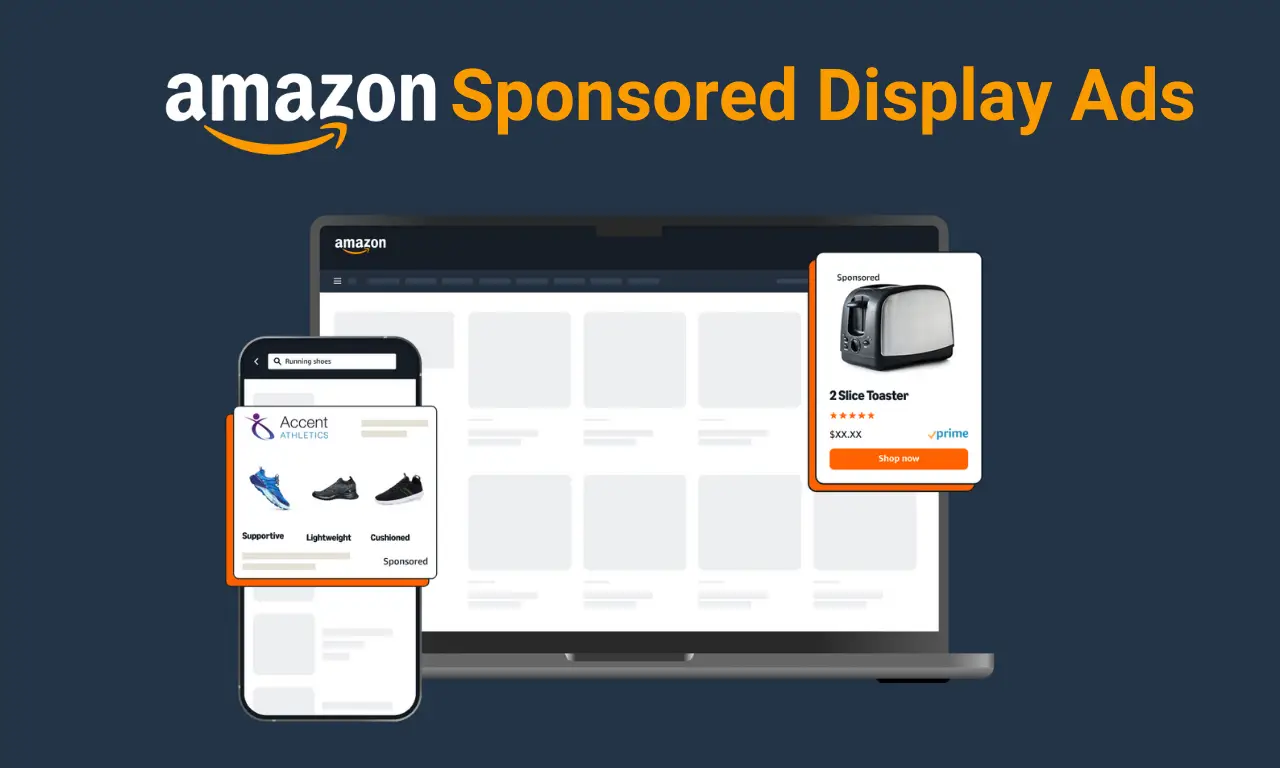
Amazon's marketplace is a competitive arena where capturing shopper attention is paramount. Amazon display ads offer sellers a powerful way to stand out by using visual advertisements to reach targeted audiences on and off Amazon. In digital marketing, display advertising refers to visual banner or video ads shown across websites or apps to promote products or brands.
Amazon has brought this concept into its own platform through Sponsored Display Ads (formerly called Product Display Ads) and the more advanced Amazon DSP (Demand-Side Platform) ads. This guide will explain what Amazon display ads are, how they work, where they appear, and how you can leverage them to boost your sales and brand visibility. We'll also compare Amazon's Sponsored Display vs. DSP, discuss targeting options, and walk through creating a campaign – all with a focus on strategies that drive growth.
What Are Amazon Display Ads?
Amazon display ads generally refer to Amazon's display advertising solutions that allow you to promote products with image or video ads on Amazon's website and beyond. The primary form is Sponsored Display Ads, a self-service pay-per-click ad type available to Amazon sellers and vendors.
Sponsored Display ads let brands engage shoppers throughout their purchase journey by showing visually rich ads to relevant audiences, both on Amazon and off Amazon. In essence, they enable you to retarget shoppers who viewed your product or similar products in the past, as well as reach new audiences based on interests or shopping behaviors.
Sponsored Display is part of Amazon's PPC advertising suite (alongside Sponsored Products and Sponsored Brands). Unlike Amazon Sponsored Products which appear in search results based on keywords, Sponsored Display ads appear in display placements and target audiences by product interest or shopping behavior rather than search queries. In other words, Sponsored Display focuses on who the shopper is or what they browsed, rather than what keyword they searched. These ads were formerly known as Product Display Ads, and have since evolved with new features like audience retargeting and video creatives.
Who can use Sponsored Display? To run Sponsored Display campaigns, you must be a professional seller enrolled in Amazon's Brand Registry or be an Amazon vendor. (If you're new to selling on Amazon, be sure to follow the steps to registering your business on Amazon first.)
Brand-registered sellers in markets like the US, Europe, and India are eligible, and your products must be in eligible categories for advertising. There is no hefty minimum spend requirement for Sponsored Display – you can start with a small daily budget and scale up as needed. This accessibility makes display ads a great entry point for sellers looking to expand their Amazon Pay-Per-Click (Amazon PPC) campaigns beyond keyword-targeted ads.
Before diving deeper, it's worth noting that Amazon's advertising platform was historically known as Amazon Marketing Services (AMS). Over the years, Amazon has rebranded AMS into today's Amazon Advertising console, which includes the Sponsored ad types we discuss here.
Mastering these ad types is crucial for sellers aiming to scale up – for instance, understanding metrics like TACoS vs. ACoS (explained in our TACoS vs ACoS on Amazon post) can help optimize your ad spend efficiency.
Amazon DSP vs. Sponsored Display Ads
When discussing "Amazon display ads," you may also hear about Amazon DSP (Demand-Side Platform). Both Sponsored Display and Amazon DSP provide display advertising on Amazon's network, but they serve different needs and come with key differences in access and capability.
Sponsored Display Ads
These are the self-service display ads we've described. They are available to brand-registered sellers and vendors through the Amazon Advertising console. Sponsored Display has no minimum budget requirement, making it accessible for smaller brands or those new to Amazon ads. You pay either per click or per thousand impressions (depending on your campaign setting), and you can easily create campaigns in Seller Central.
The trade-off is that Sponsored Display offers a predefined set of targeting options and creative formats (Amazon generates the ad layout using your product images, logo, and a headline). While you can choose between static image or video formats, the creative templates are mostly controlled by Amazon. Sponsored Display's targeting covers product-related and audience-based retargeting (more on these options below).
Amazon DSP Ads
Amazon DSP is a programmatic advertising platform that allows you to purchase display ads (and even video and audio ads) both on Amazon sites and across the wider web using Amazon's audience data. DSP campaigns are typically used by more established brands or agencies and come with a higher entry threshold. There are two ways to use DSP: Managed service, where Amazon's team runs your DSP campaigns but requires a minimum spend of $50,000 per month; or Self-service, where you (often via an agency) run your own DSP campaigns using Amazon's platform – this doesn't have an official minimum, but Amazon recommends at least $6,000–$10,000 per month to see results.
Unlike Sponsored Display, DSP is CPM (cost-per-mille) based – you pay for impressions rather than clicks. It offers much more granular targeting (e.g. demographics, lifestyle segments, third-party audiences) and creative freedom. With DSP, advertisers can upload custom banner creatives of various sizes, run video ads, and even audio ads on Amazon Music or Fire TV. This means you have full control over ad design and can deliver rich media ads that align with your branding, beyond Amazon's standard templates.
In summary, Sponsored Display vs. Amazon DSP comes down to accessibility and control. Sponsored Display is easy to start and directly controlled by the seller, ideal for quickly retargeting shoppers on Amazon with minimal fuss. Amazon DSP is a powerhouse for broader reach and advanced targeting off-Amazon, but it requires significant budget and expertise (often leveraged by agencies or experienced performance marketers using AI and programmatic strategies).
Depending on your goals, you might even use both: for example, use Amazon DSP to build brand awareness with broad audience campaigns, and then use Sponsored Display to retarget those viewers with product-specific ads and drive conversions. Many successful brands combine multiple ad types – in fact, using Sponsored Products, Brands, and Display together has been shown to increase sales by up to 15% year-over-year with better ROAS, compared to using Sponsored Products alone.
Where Do Amazon Display Ads Appear? With Examples
One of the biggest advantages of Amazon display ads is the variety of locations where your ads can surface. Sponsored Display Ads placements include a range of on-site positions as well as off-site placements:
On Amazon's Website and App
Sponsored Display ads can appear on Amazon product detail pages, search results pages, and other shopping pages across desktop, mobile, and the Amazon app. For example, on a competitor's product detail page, your ad might show under the "Add to Cart" button or below the product description as a "Sponsored" suggestion – a prime spot to catch shoppers while they consider a purchase.
They may also display in the sidebar or mid-scroll on Amazon's search results pages (especially on desktop), labeled as sponsored products or related ads. Even customer review pages have an ad slot – Amazon sometimes shows a Sponsored Display banner alongside the reviews section. The key is that Amazon places these ads where shoppers are browsing, ensuring high visibility. These placements span across devices: whether a customer is on their phone or laptop, or even browsing the Amazon app, Sponsored Display ensures your ads are visible across all screens.
Off Amazon (Third-Party Sites and Apps)
Sponsored Display extends beyond Amazon's own site by displaying ads on external websites and mobile apps that are part of Amazon's advertising network or partners. In the US (and other supported marketplaces), your ad could appear on a news site, a recipe blog, or a game app as a banner enticing the viewer to check out your product on Amazon. For instance, a shopper who viewed your product on Amazon might later see your ad on a weather app, reminding them of the item. Amazon leverages its data to serve these off-site ads to users who have shown interest in related products.
This retargeting is powerful to re-engage past visitors and is one way Amazon display ads mimic the broader display advertising tactics used in platforms like Google Display Network or Facebook Ads. (On Amazon DSP, off-Amazon placements are even more extensive – including Amazon-owned sites like IMDb, Twitch, or devices like Fire TV – but Sponsored Display also gives a taste of that reach without needing DSP access.)
In short, Amazon display ads can reach shoppers wherever they are, not just on search pages. Your product can follow interested customers around Amazon's ecosystem and beyond. A typical example of an Amazon display ad in action would be: a shopper searches for a coffee maker on Amazon, clicks a particular model but doesn't purchase; later, while reading an article online, they see a banner ad showcasing a similar coffee maker (your product) with an image, star rating, price, and a "Shop now" button linking back to Amazon.
These sorts of placements help keep your product top-of-mind. By appearing in high-visibility spots at key moments (like on competitor pages or external sites during browsing), display ads increase the touchpoints with potential buyers, which is crucial for improving conversion chances.
Benefits of Amazon Display Ads (Why Use Them?)
Amazon Sponsored Display Ads offer numerous advantages that can significantly impact your business growth. Here are some of the key benefits and reasons to include display ads in your Amazon marketing strategy:
Broadened Reach and Visibility
Sponsored Display can show your product to shoppers beyond the normal reach of search ads. Because these ads appear both on Amazon and across the wider web, they expose your products to a larger audience that might not find you through search alone. This includes reaching people who aren't actively searching on Amazon but have shown interest in related products or categories.
By tapping into Amazon's vast user data, display ads can target shoppers by their interests and behaviors, expanding your brand's visibility. In effect, it works as a full-funnel tool – you can create awareness among new audiences, not just capture those typing in keywords. For brands in growth mode, this broadened reach is invaluable for building brand recognition. Repeatedly showing your product via display ads keeps your brand in front of prospective customers, which enhances brand familiarity and trust over time.
Precision Targeting & Retargeting
Amazon display ads excel in targeted advertising. They let you focus on specific shopper behaviors and interests. You can zero in on people who viewed your product or similar products, ensuring your ads are shown only to relevant audiences. For example, with product targeting, you can literally advertise on your competitor's product pages – capturing every customer who checks out those competing items. With audience targeting, you can retarget shoppers who browsed your listing but didn't buy, or who bought a complementary item.
In fact, 92% of marketers say retargeting display ads perform as well as or better than search ads for conversions. Amazon's rich data on purchase and browsing behavior means your Sponsored Display campaigns can hone in on high-intent shoppers. By bringing back "window shoppers" who showed interest but didn't convert, display retargeting can boost conversion rates and turn more browsers into buyers.
Offensive and Defensive Marketing
Sponsored Display Ads can be used both offensively (to win new customers) and defensively (to protect your turf). Offensively, you might target complementary product audiences – e.g., advertise your phone case on pages where people are buying phones – to cross-sell. You can also target interest categories to introduce your brand to new shoppers who fit your demographic.
Defensively, you can place ads on your own product detail pages (or those of your brand's other products) to prevent competitors' ads from luring your customer away. This strategy, sometimes called product targeting defense, ensures that if someone is looking at your listing, they also see your other products or an ad reinforcing your brand's value. In essence, display ads help you expand your brand presence while also shielding your market share from rivals.
Creative Branding Opportunities
Unlike Sponsored Product ads which are text-based and blend with search results, display ads allow for visual creativity. Sponsored Display lets you include an image (product photo or a lifestyle image) and a headline text in your ad, giving a chance to convey your brand message. This visual format can quickly catch the eye of shoppers and communicate value propositions (for example, a clear product image with a bold headline like "#1 Best-Selling Coffee Maker – 20% Off Today!").
Being able to add logos or lifestyle images helps in branding and storytelling. Moreover, Amazon has introduced a video ad option for Sponsored Display – short looping videos that can showcase your product in action. Video is highly engaging and can set you apart from static ads. All these creative elements ensure your ads are not only reaching people, but also making a memorable impression. Rich visuals and engaging content strengthen brand recall, increasing the likelihood that a shopper remembers your product when they decide to buy.
Cost-Effective Advertising
Sponsored Display runs on a performance-based model, meaning you generally pay only when it works. It operates on either a cost-per-click (CPC) basis or a cost per thousand impressions (vCPM) if you choose a reach-based strategy. In the default CPC mode, you pay only when a shopper clicks your ad, not just for the ad being shown. This ensures your budget goes toward actual interested visitors, making it cost-effective since you're not charged for mere eyeballs that don't engage. Even with the vCPM option (optimize for reach), Amazon optimizes to show your ad to relevant audiences likely to view it, and charges per 1000 viewable impressions.
There's no minimum spend, so you can start small, test what works, and scale up. Many sellers find that retargeting ads can yield a high return because they focus on warm leads who are easier to convert than cold audiences. And if you monitor your campaigns (ACoS, ROAS metrics) and refine targeting, you can achieve very efficient results. In fact, a mix of Sponsored Display with other ads can improve overall advertising ROI due to recapturing potential buyers you might have otherwise lost.
Boosted Sales & Conversion Rates
Ultimately, the reason to use Amazon display ads is to drive more sales. By targeting shoppers who have shown interest or by reaching relevant new audiences, Sponsored Display can increase product page traffic and conversion opportunities. These ads specifically aim at people already in-market or considering products like yours, which means they are often further along the buying funnel. For instance, using a retargeting strategy to re-engage someone who visited your product page last week can be the nudge that turns them into a customer.
Additionally, if you run promotions or have a slight edge (price, features) over competitors, a well-placed display ad can steal the sale by attracting the shopper's attention at the critical moment on a competitor's page. Over time, the increased sales from these ads can improve your organic ranking on Amazon (since sales velocity is a factor in Amazon's algorithm), creating a positive feedback loop. More sales and visibility can even help you earn badges like the coveted "Best Seller" badge on Amazon, which further boosts conversions. In short, Sponsored Display Ads can directly contribute to higher revenue and even improve your product's standing on Amazon.
In combination, these benefits highlight why display ads are a critical tool, especially in a competitive market like Amazon India or other regions where sellers are vying for customer attention. Savvy marketers treat Sponsored Display as both a growth driver and a defensive play – it's about expanding reach, reinforcing brand message, and squeezing the most value out of every potential customer interaction. (For more region-specific strategies, check out our insights on Amazon e-commerce growth strategies in India which also touch on advertising approaches.)
Targeting Options for Amazon Display Ads
One of the strengths of Amazon's display advertising is the rich set of targeting options available. Sponsored Display offers a mix of contextual targeting (based on products or categories) and audience targeting (based on shopper behavior and interests). Choosing the right targeting ensures your ads reach the most relevant shoppers for your goals. Here's a breakdown of the targeting types:
1. Contextual Targeting: This method targets by context, meaning the content a shopper is currently viewing on Amazon.
-
Product (ASIN) Targeting: You specify particular products (ASINs) on which to show your ads. For example, you can target competitor products similar to yours, so that your ad appears on their detail pages. If you sell a new brand of headphones, you might target the ASINs of top-selling headphones in your category – when shoppers browse those, they'll see your ad for an alternative. ASIN targeting can also be used for complementary products (e.g., advertise a camera battery on popular camera listings). When a shopper clicks your Sponsored Display ad, it takes them to your product detail page, so you effectively divert some of the traffic from that ASIN to your own listing. This tactic is great for capturing high-intent shoppers and can increase consideration or cross-sell opportunities.
-
Category Targeting: Instead of individual products, you can target entire product categories relevant to your item. Amazon will then display your ads to shoppers browsing any products in that category (with some refinement options). For instance, if you sell organic dog food, you could target the "Dog Food" category to reach anyone browsing dog food listings. You can refine category targets by price range, brand, star rating, Prime eligibility, etc., to narrow down to the most relevant subset. Category targeting casts a wider net than ASIN targeting and is useful for building awareness among category shoppers or when you don't have specific competitor ASINs in mind. It ensures your product is "in the view" of consumers looking at related product types.
2. Audience Targeting: This focuses on who the shopper is or what actions they've taken, rather than what page they're on right now. Under Sponsored Display, Amazon provides several audience targeting sub-types:
-
Views Remarketing: This targets shoppers who have viewed your product or similar products in the past, within a lookback window. Essentially, it's classic retargeting – people who saw your item (or related items) but didn't purchase. You can choose lookback periods of 7, 14, 30, 60, or 90 days for views remarketing. For example, if a customer looked at your product last week, a Sponsored Display ad can re-engage them as they browse elsewhere, reminding them of your product. You can also capture those who viewed products in the same category as yours (not just your specific ASIN) in that timeframe, effectively broadening reach to "category viewers" who showed interest in products like yours. Views remarketing is great for nudging high-interest prospects and can significantly improve conversion since these shoppers are already familiar with the product. (According to some reports, retargeted audiences are far more likely to convert than cold audiences.)
-
Purchases Remarketing: This option allows you to target people who previously purchased your product, or related products, within a chosen time window. The lookback windows here can extend longer – 7 up to 365 days for past purchasers. The strategy behind purchase remarketing can be to encourage repeat purchases (useful for consumables or products with lifecycle), to upsell accessories, or to build customer loyalty. For instance, if someone bought your coffee machine in the last 6 months, you can serve them an ad for your new coffee grinder or a special offer on coffee filters. You can also reach those who bought complementary or substitute items. This targeting helps with cross-selling and retaining customers, turning one-time buyers into repeat buyers.
-
Amazon Audiences (Interests and Life Events): Amazon provides pre-defined audience segments Interests, Lifestyle, In-Market, and Life Events built from shoppers’ overall behavior using Amazon’s first-party data. These audiences help brands reach relevant shoppers who may not have interacted with their products yet, such as targeting cooking enthusiasts for kitchenware or new parents for baby products. Originally limited to vendors, many of these segments are now available to brand-registered sellers, enabling interest-based prospecting similar to platforms like Facebook or Google Display.
Amazon has also introduced Custom Audiences for Sponsored Display, which allow advertisers to build highly specific audience segments using Amazon Marketing Cloud insights. These can include granular groups such as shoppers who viewed a product multiple times but didn’t purchase. While this feature improves targeting precision, it requires access to Amazon Marketing Cloud and a higher level of technical expertise.
By choosing the right targeting approach, Sponsored Display campaigns can support different objectives across the funnel:
-
Awareness: Broad interest audiences or category targeting help introduce products to new shoppers.
-
Consideration: Views remarketing and in-market audiences work well to re-engage interested users.
-
Conversions: Product targeting and purchase remarketing focus on high-intent shoppers most likely to buy.
Many sellers run multiple Sponsored Display campaigns simultaneously, each aligned to a specific funnel stage. This full-funnel approach ensures consistent engagement from discovery through purchase, improving overall sales impact.
It’s also important to understand the limitations of Sponsored Display compared to Amazon DSP. Advertisers cannot exclude specific audiences or placements, bid differently by placement, or access advanced reporting controls. However, the available targeting options are still robust enough for most sellers when paired with regular testing and optimization. By tracking metrics like impressions, clicks, and ACOS, advertisers can refine their strategy and steadily improve performance over time.
How to Create Amazon Display Ad Campaigns
Setting up a Sponsored Display campaign is a straightforward process through Amazon's advertising console. If you've run Sponsored Products ads before, you'll find the workflow familiar. Here's a step-by-step guide to creating an Amazon Sponsored Display Ads campaign:
-
Access Campaign Manager: Log in to your Amazon Seller Central (or Vendor Central) account. Navigate to the Advertising menu and click on Campaign Manager. This is where you manage all your Amazon PPC campaigns.
-
Create a New Campaign: In Campaign Manager, click the "Create campaign" button. You will be presented with options for campaign type – select "Sponsored Display" from the list.
-
Campaign Settings: Enter a campaign name that helps you identify it (e.g., "Display – CoffeeMaker – Nov2025"), set your start and end date (or choose no end date for continuous), and allocate a daily budget. You can also assign the campaign to a Portfolio if you use them for organization (portfolios group campaigns and help track spend by brand or product line). For budget, start with an amount you're comfortable testing. Many sellers might start at ₹500 – ₹1000 per day (or $10–$20) and then adjust based on performance.
-
Ad Group & Bidding Strategy: Next, create an Ad Group within the campaign. Name the ad group (if you want to segment by product or targeting type, the name could reflect that, like "CoffeeMaker_Retargeting"). Now choose a Bidding (Optimization) Strategy for this ad group. Amazon offers three bidding optimization options for Sponsored Display:
Optimize for Reach (vCPM): Bids for maximum impressions; you pay per 1000 viewable impressions.
Optimize for Page Visits (CPC): Bids to get more clicks; you pay per click.
Optimize for Conversions (CPC): Bids to get likely converters; pay per click, but Amazon shows ads to those deemed likely to purchase.
If unsure, Amazon recommends "Optimize for conversions" as a good default for sellers focused on sales. This will use CPC bidding aimed at people likely to buy. Select the strategy that aligns with your goal (e.g., choose reach if you want broad visibility for a new product launch). You'll also set a base bid – how much you're willing to bid (per click or per 1000 impressions). You can start with Amazon's suggested bid or a conservative low bid and later increase if you need more impressions.
Ad Format – Image or Video:
Choose the ad format for your Sponsored Display campaign. Amazon currently offers two formats, each suited to different creative needs and objectives.
-
Static Image: Uses a product image (either your listing’s main image or a custom upload) along with text and a call-to-action. This is the most commonly used format and works well for clear product-focused messaging.
-
Video: Allows you to use a short, soundless looping video to showcase your product in action or highlight key features. For example, a brief clip of coffee being brewed can be far more engaging than a static image.
Select the format that best fits your campaign. If choosing video, ensure the asset meets Amazon’s guidelines: 16:9 aspect ratio, minimum 1280×720 resolution, and a duration between 6–45 seconds, with 20 seconds or less recommended for optimal engagement.
Product Selection:
Select the product ASIN(s) you want to advertise within the ad group. While multiple ASINs can be added, best practice is to focus on a single product or a closely related group to maintain targeting clarity. Amazon automatically pulls product details - such as images, title, price, and ratings - to generate the ad creative and landing experience.
Choose Targeting Type:
Decide whether the ad group will use Contextual targeting or Audience targeting. Each ad group supports only one approach.
-
Product targeting: Target specific products or categories, such as competitor ASINs.
-
Audience targeting: Reach shoppers using options like views remarketing, purchase remarketing, or Amazon-defined audiences.
Amazon’s interface will guide you through the selection. For example, you might choose “Views remarketing – 30 days” under Audiences or add competitor ASINs under Product targeting.
Add Targeting Details:
Once the targeting type is selected, add the actual targets. For product targeting, search and select ASINs or refine categories. For audience targeting, choose preset segments or define lookback windows. Use available refinements; such as excluding your own products or filtering by star ratings-to keep targeting focused and efficient.
Creative Elements (Customizing Ad Creative):
Amazon automatically generates a base ad using product information, but you can enhance it by adding a brand logo and headline. A concise headline (up to 50 characters) can improve click-through rates—for example, “Brew Barista-Quality Coffee at Home!”. Ensure all messaging complies with Amazon’s ad policies. If using video, upload the video file here and preview placements across desktop and mobile where available.
Launch the Campaign:
Review all settings, including budget, bids, targeting, and creative. When ready, click “Submit” or “Launch Campaign.” Amazon will review the ad, and once approved, your Sponsored Display campaign will begin running.
After launch, monitor performance in Campaign Manager, tracking metrics such as impressions, clicks, spend, sales, and ACOS. Allow campaigns a few days to gather data, then optimize by adjusting bids, refining targets, or pausing underperforming ASINs. For example, if certain product targets spend without driving sales, reallocate budget to higher-performing segments or narrow the audience to improve efficiency.
Best Practices
When launching Sponsored Display, keep these tips in mind:
Segment campaigns by strategy: You might create separate campaigns for different objectives (one for competitor targeting, one for retargeting, one for category expansion) so you can allocate budgets and optimize each separately. -
Use sufficient budget: Ensure your daily budget isn't too low; if it runs out by afternoon, you miss potential conversions later in the day. It's often better to slightly overshoot and then reduce if you consistently hit the cap. Amazon even suggests keeping an eye on campaigns that frequently exhaust budget to avoid losing impressions. -
Relevance is key: Choose products to advertise that have good reviews, competitive pricing, and strong images. If the ad drives traffic but your listing is unappealing (poor images or bad reviews), it won't convert – leading to wasted spend. Optimize your product listings (through Amazon SEO techniques) in parallel so that any ad traffic has a higher chance to convert.
Leverage creatives: Don't skip adding a custom headline or image if it can make your ad more compelling. A catchy headline or an eye-grabbing lifestyle image can significantly improve click-through rate. Think about what message will entice your target audience to click.
Monitor and iterate: Use the data from your campaigns to make informed decisions. For example, check which target ASINs are yielding sales and which aren't – and reallocate budget accordingly. If you notice a particular audience segment (say, "in-market for smartphones") is performing well, consider dedicating more budget or separate campaigns to it. Always align with your ACoS/ROAS goals and adjust bids over time.
Combine with other ads: Sponsored Display works best as part of a holistic Amazon advertising strategy. Running Sponsored Products to capture keyword searches and Sponsored Brands for brand visibility, alongside Sponsored Display for retargeting, creates synergy. Each ad type reinforces the other – a customer might first discover your product via a search ad, then see your display ad later and decide to purchase. Diversify your ad mix to maximize reach and conversion opportunities.
By following these steps and tips, you can create well-structured Amazon display ad campaigns that drive results. The process is user-friendly, and even if you're not an expert designer (Amazon takes care of most of the ad format), you can have a campaign up in minutes.
As always, the real effectiveness comes in the optimization phase, so pay close attention to campaign analytics and continuously refine your approach. With time and tweaking, Amazon Sponsored Display Ads can become a high-ROI component of your marketing arsenal, helping you capture more shoppers and grow your Amazon sales.
Conclusion: Driving Growth with Amazon Display Ads and Beyond
Amazon Display Ads - through Sponsored Display campaigns and Amazon DSP for brands ready to scale - are powerful tools to drive visibility, re-engage high-intent shoppers, and accelerate sales growth. By placing visual ads in front of the right audiences at the right moments, sellers can strengthen brand presence and convert interest into revenue. Display advertising on Amazon is no longer optional; it is a core component of a full-funnel growth strategy for serious sellers.
That said, success with Amazon advertising requires more than platform knowledge - it demands consistent execution, optimization, and strategic decision-making. This is where expert support becomes critical. At GrowthJockey, we help brands scale e-commerce growth through data-driven advertising and execution-led strategies. As a venture builder and growth partner, we don’t just advise - we plan, execute, and optimize campaigns to deliver measurable outcomes.
We act as an extension of your team, combining Amazon PPC, SEO, conversion optimization, and advanced advertising strategies to drive sustainable growth. If you’re looking to take your Amazon performance to the next level, GrowthJockey can help you build, scale, and optimize with confidence.
Ready to dominate Amazon and beyond?
Get in touch with GrowthJockey and let’s build your growth story.








Industries
Growth
Operations
Technology