
Guide To Amazon A Plus Content Examples & Image Dimension Guidelines

Amazon A+ Content (also known as Enhanced Brand Content) is a premium listing feature that lets brand-registered sellers enrich product detail pages with rich media. It allows brands to tell their story using high-quality images, videos, comparison charts, and custom text modules. As Amazon explains, "A+ Content helps bring your brand's story to life by adding videos, enhanced images, shoppable product-comparison charts, and more to your product detail pages".
By showcasing products with this enhanced visual storytelling, listings become more engaging and informative, which can significantly drive customer interest and sales. In fact, Amazon reports that well-crafted Basic A+ Content can boost sales by up to 8%, while thoughtfully implemented Premium A+ Content can lift sales by as much as 20%[1].
Amazon's own guidance notes that A+ Content gives shoppers a deeper view of features and benefits. For example, standard product listings are usually limited to 2,000 characters and bullet points without images, but with A+ Content "brand owners registered on Brand Registry can present the product's features, benefits, USP (unique selling point), and brand narrative in a detailed and captivating manner". In practice, A+ pages often appear below the fold in the "From the Manufacturer/Brand" section, allowing brands to build trust and loyalty. On these pages, sellers can add sections like Brand Story, Detailed Descriptions, Comparison Charts, Lifestyle Imagery, and even video modules (in Premium content) to offer a richer shopping experience. The result is a more immersive listing where "customers can connect on a deeper level with your brand", making informed purchasing decisions and reducing return rates.
Some independent analyses support these benefits. For instance, a third-party study found Basic A+ users saw an average sales lift of 5.6%, while Premium users saw an even higher lift (~20%)[2]. In practical terms, this means using A+ Content effectively is a powerful growth strategy for Amazon sellers: it can improve conversion rates, amplify brand awareness, and create a more polished, professional storefront. According to Amazon's, A+ Content "provides a platform to brand owners…to showcase [their brand] in a captivating way," which helps potential buyers learn about the brand and its products more efficiently.
Who Can Use Amazon A Plus Content?
Amazon limits A+ Content to brand-registered sellers and professional accounts. To be eligible, you must have an Amazon Brand Registry enrollment (a brand-registered account, usually requiring a trademark) and an active Professional selling plan. As Amazon states: "To use A+ Content, you need a Professional selling account and be a Brand Representative for a brand enrolled in Amazon Brand Registry". In other words, private-label sellers must first register their brand with Amazon, and sellers on an individual plan cannot use A+ Content.
When creating A+ Content, you choose one of several content types. Basic A+ Content (sometimes just called "A+") is available to all brand-registered sellers and includes image and text modules like headers, image + text blocks, and comparison charts. Premium A+ Content is a more advanced tier with larger modules, video, interactive features, and Q&A sections. Premium A+ is invite-only: brands must meet strict criteria (e.g. publish a Brand Story module on all products and have five approved A+ projects in the past year) before Amazon grants access. There's no direct fee for A+ Content itself – it's included with the selling account – but Premium access is limited to qualified brands (including invited 1P vendors and Launchpad sellers).
Amazon also offers a special variant for book authors. KDP A+ Content (for Kindle Direct Publishing) lets authors add rich modules to book product pages under the "From the Publisher" section. Although KDP's A+ guidelines are similar in spirit (e.g. using 17 module types and up to five modules per layout), it's tailored to books (with cover images, author info, etc.). For most product sellers, the focus remains on Basic vs Premium A+ for physical goods.
Benefits of Using Amazon A+ Content
Using A+ Content strategically offers several key benefits:
Increased Conversions
High-quality images, infographics, and detailed text make it easier for shoppers to understand a product's value. By addressing customer questions and highlighting benefits visually, A+ pages can raise confidence. For example, Amazon and partners have documented conversion uplifts (Basic A+ ~5-8% increase, Premium ~20%). The Amazon India blog similarly notes that A+ Content gives "brand owners…a platform to express all about their brand and showcase it in a captivating way," which translates to better purchase decisions.
Enhanced Brand Storytelling
A+ modules let brands weave narratives (e.g. origin stories, mission, certifications) into the listing. Storytelling elements create an emotional connection with buyers. According to Amazon, the Brand Story feature helps "captivate your audience" and leave a lasting impression. By using infographics, lifestyle photos, and brand-centric layouts, sellers reinforce brand identity. Third-party guides emphasize that A+ is not just about the product but also about telling a cohesive brand story.
Product Differentiation and Cross-Selling
A+ Content allows comparison charts and sliders to showcase multiple products or accessories. For example, a comparison chart can highlight several related SKUs or variations side-by-side. This not only educates the buyer (helping them choose the right model) but also opens opportunities to upsell. Interactive modules (Premium) can include "Add to Cart" buttons or links, encouraging customers to add more items directly from the chart.
Reduced Returns
Clear visuals and Q&A sections help ensure customers know exactly what they're getting. Sellers can pre-empt common concerns by featuring a Q&A module that answers frequently asked questions. Studies suggest that thorough listing information reduces misunderstandings, leading to fewer returns. In the A+ guide, Amazon highlights that anticipating and addressing questions can "help customers make educated purchasing decisions".
SEO and Competitive Edge
While Amazon hasn't confirmed A+ content directly affects search ranking, there's indirect SEO value. Content-rich pages tend to convert better; higher conversions improve sales velocity and ranking in Amazon's A9 algorithm. If a seller's competitors use A+ and you don't, your listing may appear less professional by comparison. Conversely, having the best A+ page in a category can distinguish your brand. Many experts advise even smaller brands to invest in A+ content for the competitive advantage.
In practical terms, A+ Content is now part of a broader Amazon marketing strategy. For example, combining an optimized A+ page with a strong Amazon PPC campaign or sponsored ads can multiply results. High-quality content makes ads more cost-effective, since ad-driven traffic hits a conversion-ready page. Integrating A+ with your overall Amazon advertising strategy and promotions ensures every click has a chance to convert. Similarly, monitoring listing performance via real-time analytics and sales analytics apps enables iterative improvements: you can see how changes to your A+ modules affect sales and keyword rankings.
How to Create Amazon A+ Content
Creating A+ Content involves several steps and follows Amazon's guidelines:
1. Ensure Eligibility
Verify that your account meets the prerequisites. You need a Professional selling plan and an enrolled brand (Brand Registry). Also check that your product's category supports A+ (most do, except some like Books, Music, Video, and DVD currently do not). If you're not already a registered seller, start with registering your business on Amazon and enrolling in Brand Registry.
2. Access A+ Content Manager
In Seller Central, go to Advertising > A+ Content Manager. Amazon's platform will guide you through creating a new A+ Content project. The process is straightforward: after logging in, click "Start creating A+ Content" and select the content type (Basic or Premium).
3. Choose ASIN and Template
You'll first select the ASIN (product) to which the content applies. Then pick a module layout or template. Amazon provides a gallery of modules (e.g. image header, feature bullets, comparison chart, text blocks). The Basic tier offers up to 17 module types, and Premium extends to 19 options. Use a mix that suits your product (e.g. tech specs tables for electronics, lifestyle photos for apparel).
4. Add Text and Images
Populate each module with optimized content. Write concise, benefit-focused copy: think of bullet-point style for readability. "Avoid long blocks of text" is key; instead use brief paragraphs and bullet lists. Write all copy in Seller Central (not embedded in images) so it's visible on all devices.
For images, follow Amazon's specifications: use high-resolution JPG or PNG files (preferably 300 DPI) and do not exceed the max file size (typically 2-3 MB per image). Save images at recommended dimensions (Amazon's guidance suggests around 970×600 pixels for headers, with modules requiring at least 600×180 px or more). Avoid overcrowding images with text or logos: as Amazon advises, embedded text can become blurry on mobile.
Amazon now provides generative AI tools within A+ Content Manager to speed up content creation. With one click, you can generate copy and imagery from your ASIN using Amazon's AI models. These tools can draft product descriptions, produce lifestyle images, or brainstorm module content, which you can then edit. While AI can jumpstart the process, it's crucial to review all generated content for accuracy and brand fit. Alternatively, many sellers use design resources like Canva or Photoshop to create A+ images. In fact, free A+ templates (sized to Amazon's specs) are available online. Using a ready-made layout can ensure compliance with size and format requirements.
5. Review and Submit
After filling modules, preview your A+ page in Seller Central. Check that all text is legible, images look sharp, and mobile optimization is acceptable (especially important if you opted for Premium, since Basic content is not fully mobile-optimized). Amazon will then review the submission, typically within 7 business days. If approved, the content goes live. If rejected, Amazon's feedback will indicate what to correct (often issues involve prohibited claims, low-res images, or trademark usages).
Throughout this process, keep Amazon's content guidelines in mind. These include general rules (no promotional language, no false claims, etc.) and module-specific guidelines. For example, technical spec modules should list factual data, FAQ modules should contain only factual questions, etc. Always double-check Amazon's published A+ policy pages if you have any doubt.
A+ Content Design Tips
To make the most of A+ Content, follow best practices in design and copy:
Balance Text and Images
Use high-quality product photos and lifestyle images to grab attention, paired with concise text to explain features. For example, a full-width image on top with a short title and tagline sets the stage. Then follow with alternating text and image blocks. Keep paragraphs short and use bullet lists for easy scanning. Avoid putting too much text on one image – instead, use image captions or adjacent text modules so mobile users can read.
Include Key Specifications
A table or list of technical specs helps answer customer questions. Amazon's "Technical Specifications" module is ideal for electronics or appliances (e.g. dimensions, weight, battery type, etc.). Think about what details matter most to buyers and put those in a clearly labeled module.
Use Comparison Charts
Product comparison tables (available in both Basic and Premium content) let you highlight differences between models or products. This is useful for cross-selling. For example, you might show three variations of your product side-by-side with their unique features. (Premium charts can even include "Add to Cart" buttons and live review scores.) Properly done, a comparison chart educates buyers and encourages exploration of your catalog.
Tell Your Brand Story
Use the Brand Story or rich text modules to connect emotionally. Share what makes your brand unique: origin story, sustainability efforts, or craftsmanship details. Amazon notes that "Storytelling can be a powerful marketing method," and A+ Brand Story modules are ideal for this. For instance, include an image of your team or factory alongside a paragraph about your mission. The goal is to build trust and loyalty by making the brand relatable.
Use Video (Premium)
If you have product videos or how-to clips, include them. Amazon cites that 96.3% of customers find video crucial for researching products, and shoppers who view videos are 3.6× more likely to buy[3]. A short clip showing the product in action can clarify its use better than text alone. Keep videos professional and focused, and write a clear caption or call-to-action.
Interactive Hotspots (Premium)
Use the hover/click hotspot module on a product image to call out key parts. For example, an image of a backpack could have hotspots on the straps, pockets, and logo, each revealing detail text. This engages customers by letting them explore. As Amazon explains, hotspots highlight aspects of a product "to engage customers and help them understand why [it is] worth purchasing".
Carousel Slideshows (Premium)
The slider gallery (carousel) module lets you combine multiple images or videos in a scroller. You can use it to show product in different settings or step-by-step usage. Premium carousels can be very wide, fully grabbing the browser's width. For instance, a camera could have a carousel of shots from various use cases (portrait, landscape, night mode). Include captions or short text overlays with each slide to reinforce messages.
FAQ / Q&A Modules (Premium)
If your products often raise the same questions (compatibility, usage, warranties), address them in a FAQ section. Amazon recommends creating Q&A sections to "provide clear and comprehensive answers" to anticipated customer questions. This proactive approach can allay buyer doubts, making purchase decisions smoother.
Maintain Visual Consistency
Use your brand's color scheme and fonts for headings and overlays. Many vendors use consistent iconography or color accents across modules to reinforce branding. Every module and image should support the key selling points. Above all, ensure high image quality: Amazon warns against using low-resolution or resized images. Follow Amazon's specs (JPG/PNG at max resolution, ≤3 MB), and double-check that photos aren't blurry on mobile. If space allows, include lifestyle shots (showing the product in use) and infographics (icons + text) which Amazon highlights as effective for conveying features.
By carefully following these design tips and Amazon's guidelines, your A+ Content will be both appealing and compliant, maximizing the chance to convert browsers into buyers.
A+ Content Templates For 2026
Below are the most effective A+ Content templates for 2026, including when to use them and how they drive conversions.
1. Hero Image + Value Proposition Template (Most Widely Used)

Best for: Almost all categories (especially D2C, FMCG, electronics, home & lifestyle)
Structure
-
Full-width hero image at the top
-
Short headline highlighting the primary benefit or USP
-
Supporting subtext reinforcing the core value proposition
Why it works
This template aligns with natural browsing behavior: shoppers process visuals before text. A strong hero image paired with a clear value statement sets expectations immediately and anchors attention, reducing bounce even though A+ Content appears below the fold.
Pro tip
Focus on outcomes, not materials or specs. The headline should answer one question clearly: Why should I care about this product over others?
2. Feature Breakdown (Icon + Text Grid) Template
Best for: Electronics, appliances, fitness equipment, tools, functional products
Structure
-
3-6 feature blocks arranged in a grid
-
Each block includes an icon or image
-
Short feature title with 1-2 lines of explanatory text
Why it works
This template improves scannability by replacing dense bullet points with visual cues. Shoppers can quickly understand functionality and benefits without cognitive overload, making it ideal for feature-heavy products.
Pro tip
Translate features into outcomes. Focus on what the customer gains, not just what the product has.
3. Lifestyle Storytelling Template
Best for: Apparel, beauty, wellness, home décor, premium consumer brands
Structure
-
Lifestyle image showing the product in real-world use
-
Supporting copy describing the context or experience
-
Optional brand or usage narrative
Why it works
Lifestyle visuals help shoppers imagine ownership. By placing the product in a relatable scenario, this template builds emotional connection and reinforces how the product fits into everyday life.
Pro tip
Use authentic, context-rich imagery. Avoid generic stock photos that feel staged or disconnected from real usage.
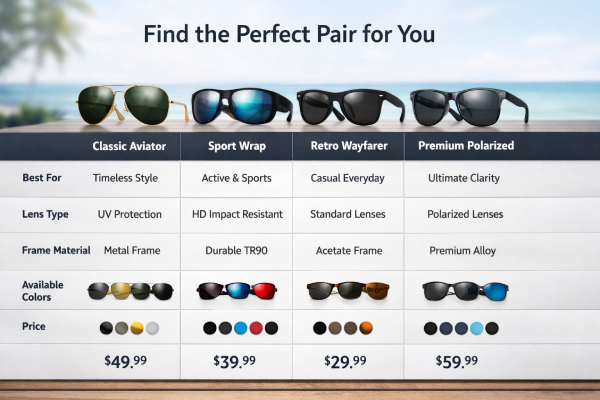
4. Product Comparison Chart Template
Best for: Brands with multiple SKUs, bundles, or product variations
Structure
-
Comparison table with 3–6 products
-
Rows highlighting key differentiators
-
Clear visual hierarchy for easy comparison
Why it works
Comparison charts reduce decision friction by helping shoppers self-select the right product. They also keep users within your catalog, increasing cross-sell and average order value.
Pro tip
Always include a “Best for” row to guide undecided buyers toward the most suitable option.
5. Technical Specifications Template
Best for: Electronics, furniture, appliances, industrial or B2B products
Structure
-
Clean table or structured list format
-
Factual data such as dimensions, materials, weight, compatibility
-
No marketing language
Why it works
This template satisfies rational buyers who want validation before purchase. Clear specifications reduce uncertainty, prevent misunderstandings, and lower return rates.
Pro tip
Keep the language strictly factual. Promotional or exaggerated claims often lead to Amazon rejections.
6. Brand Story Template (Trust Builder)
Best for: Private labels, sustainability-focused brands, emerging D2C brands
Structure
-
Brand logo or brand-led imagery
-
Short narrative about mission, values, or origin
-
Supporting visuals reinforcing credibility
Why it works
Brand storytelling builds trust and differentiation, especially in crowded categories. It helps shoppers understand who they are buying from, not just what they are buying.
Pro tip
Focus on credibility signals (quality standards, purpose, consistency) rather than emotional fluff.
7. FAQ / Objection-Handling Template (Premium)
Best for: Complex products, first-time purchase categories, high-return SKUs
Structure
-
3–6 common customer questions
-
Clear, factual answers
-
Structured Q&A layout
Why it works
Addressing objections proactively removes friction from the buying process. When customers feel informed, they are more confident and less likely to abandon or return the product.
Pro tip
Base FAQs on real customer questions from reviews, returns data, or support tickets.
Integrating A+ Content into Your Amazon Strategy
A+ Content should not stand alone - it's most powerful when tied into your broader Amazon strategy. Below are some ways to integrate it effectively:
Synergy with Advertising & PPC
Use A+ pages to boost the ROI of ads. For example, if you run Sponsored Products or Sponsored Brands campaigns, ensure the landing product has stellar A+ Content. The richer page will convert more of the ad traffic. Conversely, use Amazon Ads to drive high-intent shoppers to your A+ content. Also consider promoting key benefits from A+ in your ad copy. For instance, if your listing has a video demo or comparison chart, mention "see our video" or "compare models" in Sponsored Brand headlines. This integration helps optimize every ad dollar spent, as more ad-driven clicks become sales with improved listings.
Data-Driven Optimization
Monitor and refine your A+ Content using analytics. Track metrics like traffic, conversion rate, and keyword ranking before and after updates. Tools like real-time analytics dashboards or sales analytics apps can show how changes to your A+ content impact sales velocity. For example, if adding a new FAQ or video module coincides with higher conversion, you'll see it in the data. Over time, A+ Content should be treated like a living asset: test new layouts, run A/B experiments (where allowed), and iterate to maximize results.
Fulfillment and Operations
While A+ Content is mostly marketing, it ties into fulfillment and operations indirectly. Sellers using Fulfillment by Amazon (FBA) or Multi-Channel Fulfillment (MCF) benefit from A+ because high-converting listings reduce inventory aging and streamline turnover. Ensure that all channels selling the product (Amazon, your own site, other marketplaces) have consistent descriptions and images. If you mention in your A+ Content that the product is "ship-ready in 24h" or "comes with USB cable," make sure your operations team meets those expectations. Good operations (fast shipping, low defect rate, accurate listings) complement great content.
Brand Analytics & Market Research
Use Amazon Brand Analytics Reports (available to brand-registered sellers) to gauge A+ effectiveness. Brand Analytics can show which search queries lead to your products and how often customers click through. After deploying new A+ content, you might see a shift in popular search terms or an increase in click-through-rate (CTR) for branded queries. The Amazon Brand Analytics data can highlight if customers are engaging more with your listing. For instance, a spike in "Images/Infographics" views or longer time on page indicates strong A+ engagement.
Global Strategy
If you sell internationally, remember that A+ Content can often be translated and localized. The core modules apply across marketplaces, so a strategy that worked on Amazon.com can be adapted for Amazon.in, Amazon.co.uk, etc. Be mindful of local preferences (for example, Indian customers might value different infographics or badges). Using Amazon's Global Selling tools, you can replicate your A+ pages in other regions, broadening the impact of your investment.
Conclusion
Amazon A+ Content works best when it’s treated as a growth lever—not just a design upgrade. When aligned with keyword strategy, advertising, and fulfillment, it strengthens brand trust, improves conversions, and compounds the impact of your Amazon investments.
At GrowthJockey - Full Stack Venture Builder, we help brands integrate A+ Content into a full-funnel Amazon growth system combining data, creative, and performance optimization to drive sustainable results. If you’re ready to turn your product pages into scalable revenue assets, GrowthJockey can help you build A+ Content that actually moves the needle.
FAQs
Q1. What exactly is A+ Content?
A+ Content (Enhanced Brand Content) is a premium listing feature for brand-registered sellers. It lets you enhance your product pages with custom modules (images, text, charts, videos) to better showcase your products and brand.
Q2. How do I create A+ Content?
Log into Seller Central, ensure you have Brand Registry, and go to Advertising → A+ Content Manager. Click "Start creating A+ Content", choose Basic or Premium, select your ASIN, then pick modules and fill them with images/text. Submit for Amazon's review.
Q3. Is A+ Content free?
The Basic A+ Content feature is free for all eligible brand-registered sellers. There's no extra charge to add A+ modules. Premium A+ Content is also free if you qualify, but access is limited (usually by invite and meeting certain criteria).
Q4. What are Amazon's image requirements for A+?
Use high-resolution JPG or PNG images at the module's recommended dimensions. Amazon typically requires images at least 600×180 px (often much larger), saved at 300 DPI, and under 2–3 MB in size. Never put crucial text in images, as text should be added in the content fields (not embedded).
- In fact, Amazon reports that well-crafted Basic A+ Content can boost sales by up to 8%, while thoughtfully implemented Premium A+ Content can lift sales by as much as 20% - Link ↑
- Some independent analyses support these benefits. For instance, a third-party study found Basic A+ users saw an average sales lift of 5.6%, while Premium users saw an even higher lift (~20%) - Link ↑
- If you have product videos or how-to clips, include them. Amazon cites that 96.3% of customers find video crucial for researching products, and shoppers who view videos are 3.6× more likely to buy - Link ↑









Industries
Growth
Operations
Technology