
Amazon MCF (Multi-Channel Fulfillment): Fees, Benefits & Working Explained

Amazon Multi-Channel Fulfillment (MCF) leverages Amazon's world-class logistics network to pick, pack, and ship orders from any sales channel. In practice, this means the same inventory you send to Amazon can serve orders placed on Amazon and off-Amazon channels (your own website, social media shops, or other marketplaces).
With MCF, sellers tap into the fast two-day (Priority) or three-day (Standard) delivery promise of Amazon to delight customers everywhere. If you're just starting out, make sure your business is registered on Amazon – for example, see our guide on steps to register your business on Amazon – then you can enable MCF from your Seller Central account. (Even non-Amazon sellers can sign up for MCF through Amazon's Supply Chain portal.)
Key Benefits of Amazon MCF
• Fast, reliable fulfillment: MCF delivers orders in as fast as 2 business days (Priority) or 3 days (Standard). In surveys, fast shipping was a top factor for customers – and MCF ensures on-time delivery using Amazon's fulfillment centers.
• Simple, all-inclusive pricing: There are no hidden fees or long-term contracts. Amazon charges a single fulfillment fee per unit that covers picking, packing, and shipping. (New sellers often qualify for incentives: e.g. 10% off the first 100 units shipped with MCF as a welcome bonus.)
• Unified inventory: Use one pool of inventory to serve Amazon.com buyers and customers from your own site or other channels. You can repurpose your existing FBA inventory for MCF orders, saving time and storage costs.
• Broad integrations: Amazon provides 100+ prebuilt integrations (Shopify, WooCommerce, BigCommerce, etc.) so you can automatically route orders from your stores to MCF. For example, the official Shopify app lets you sync product catalog, inventory, and order status between your Shopify store and Amazon MCF.
• Brand-neutral packaging: MCF ships all orders in unbranded Amazon boxes by default. Customers see a generic package, so your brand remains at the forefront.
• Real-time tracking and promises: You can display precise delivery-date estimates on your site (via MCF fast badges) to boost conversions. Both you and your customers get up-to-the-minute tracking from fulfillment center to doorstep, just as you do with Amazon orders.
MCF essentially gives you the same rapid delivery experience on every channel – a key reason many sellers turn it on. By outsourcing logistics to Amazon's network, you can focus on product, marketing, and customer service, rather than warehouse operations.
How Amazon MCF Works (Step-by-Step)
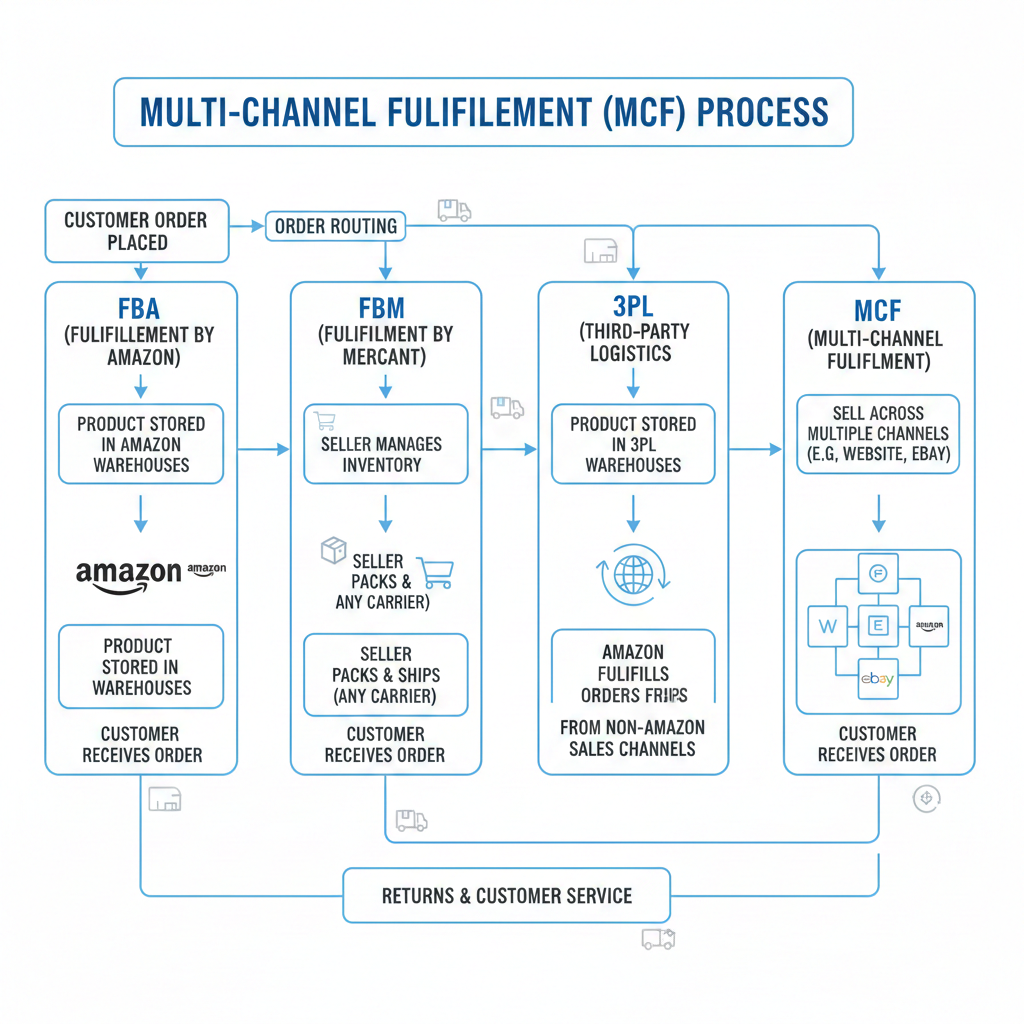
Using Amazon MCF is straightforward once set up. Here's how it typically works:
Send Inventory to Amazon
Ship your products to Amazon's fulfillment centers (either new shipments or existing FBA stock). Amazon will receive, inspect, and store your items, adding them to a unified inventory pool.
Amazon Stores and Syncs Your Products
Once in Amazon's network, your inventory is warehoused and made ready for any channel's orders. The system automatically maintains stock levels and syncs with your listings.
Customer Places an Order on Any Channel
When a customer buys from your website, social media shop, or another marketplace, you simply create a fulfillment order in Amazon Seller Central (or via API) to request MCF. Alternatively, integrated systems (Shopify apps, multi-channel order managers) can automatically push these orders to MCF.
Amazon Picks, Packs, and Ships
Amazon's fulfillment teams then process the order – picking the items from the shelf, packing them with invoice, and shipping them to the customer. You don't need to handle any physical logistics.
Delivery to Customer
The package is delivered using Amazon's reliable carriers. Customers get email updates and can see tracking (via Amazon Logistics or Swiship) just as with any Amazon shipment.
Throughout this process, you can monitor MCF orders in Seller Central. In the Manage Orders page, any MCF shipment will be listed alongside your Amazon sales, showing carrier and tracking information. You can also share a direct Swiship tracking link with customers, which aggregates tracking for all carriers. If you use Amazon's Selling Partner (SP-API), the "GetPackageTrackingDetails" API returns all tracking events for an MCF order, so you can automate updates into your own systems.
Amazon MCF in India
Amazon has tailored MCF for the Indian market with extensive local logistics. The MCF network in India covers over 20,000 pincodes nationwide, using Amazon's tens of millions of cubic feet of warehouse space and a fleet of delivery stations (1,950+ stations). This means almost any address in India can receive orders via MCF. Key India-specific features include:
Pan-India Reach
MCF sellers can fulfill orders to customers across the country, even those in remote areas. Amazon's localized fulfillment centers and partner carriers support this breadth.
Distance-Based Pricing
To help manage costs, MCF India uses distance-aware unit-based pricing. Sellers pay rates tailored to local, zonal, and national deliveries, giving you control over cost estimates.
Multi-Unit Discounts
Amazon offers tiered discounts for multi-item shipments (e.g. up to ~37% off on two-unit orders). This encourages consolidating orders and reduces per-item fulfillment cost on bulk sales.
All-in-One Solution
MCF India handles everything from doorstep pickup of your goods to final delivery. Amazon takes care of receiving shipments of your products, storing them, picking/packing orders, invoicing customers, and delivering – you just create the fulfillment orders. Even customer payment options (prepaid, credit/debit card, UPI, Cash on Delivery) are supported at delivery.
Enhanced Reporting
Indian sellers get detailed MCF fees and charges shown in Seller Central's payment reports. This transparency helps reconcile costs and optimize shipping choices.
These features make Amazon MCF a truly end-to-end D2C and multi-channel solution in India. You can leverage your FBA inventory to also feed D2C orders, expanding your business without building your own logistics operation.
Integrations and Multi-Channel Selling
Amazon MCF shines when combined with multiple sales platforms. For example, Amazon's Shopify integration app allows Shopify merchants to sync their product catalog, inventory, and orders with Amazon MCF. Once connected, your Shopify orders automatically become Amazon fulfillment requests, and you see MCF tracking right in the Shopify admin. This turns your Shopify store into a front end for Amazon's warehouse network.
MCF also supports orders from other marketplaces and sales channels. The service effectively acts as a third-party logistics (3PL) partner, so you can use it to fulfill orders from Walmart Marketplace, eBay, Etsy, and others. In fact, Amazon has specific tools for Walmart sellers: you can configure MCF to automatically receive Walmart orders and even block Amazon Logistics as a carrier (since Walmart disallows AMZL deliveries). (Amazon is even waiving the 5% surcharge on non-Amazon logistics for Walmart orders through early 2027.)
Other common integrations include WooCommerce, BigCommerce, TikTok Shop, Temu, and more. You can connect through Amazon's MCF APIs or partner apps (like WebBee or GeekSeller) to bring orders in. The key point is that all these orders draw from the same Amazon inventory pool, and shipping is handled with Amazon's speed and reliability. For the customer, a Wix or WooCommerce purchase looks just like an Amazon shipment (fast delivery, tracking updates).
In summary, MCF lets you scale on any platform. Whether you sell on Shopify, your own website, or another marketplace like Walmart or Flipkart, Amazon will fulfill the order. This removes one major headache of multi-channel selling: you no longer need separate warehouses or carriers for each channel.
Pricing, Fees, and Cost Considerations
Amazon MCF follows a predictable, per-unit pricing model. You pay a flat fulfillment fee per item - based on product size, weight, and delivery speed which covers picking, packing, and shipping. Unlike FBA, MCF does not charge Amazon referral fees since the sale happens outside Amazon; you only pay for fulfillment. However, storage fees still apply for inventory stored in Amazon fulfillment centers, similar to FBA.
To avoid unnecessary costs, it’s important to plan inventory levels carefully and understand how different Amazon seller charges impact your overall margins
In India, the distance-based rate card means you'll see different fees for local, zonal, or national deliveries. Be sure to review the rate card (available on Amazon Seller Central) to estimate costs for your target markets. Also note the multi-unit discounts for MCF: shipping 2+ units together can reduce the per-unit fee significantly. If you frequently ship bundles or multi-quantity orders, these discounts add up.
New sellers often see promotions (for instance, Amazon sometimes offers limited-time discounts on MCF fulfillment fees). Additionally, because MCF counts as a 3PL service, you may compare its costs to outsourcing to an external 3PL. Generally, Amazon's scale and negotiated carrier rates keep MCF fees competitive. (Be aware: unlike small 3PLs, Amazon's fee structure is fully transparent on Seller Central – no hidden markup.)
Comparing Fulfillment Models: FBA vs FBS vs FBM vs 3PL
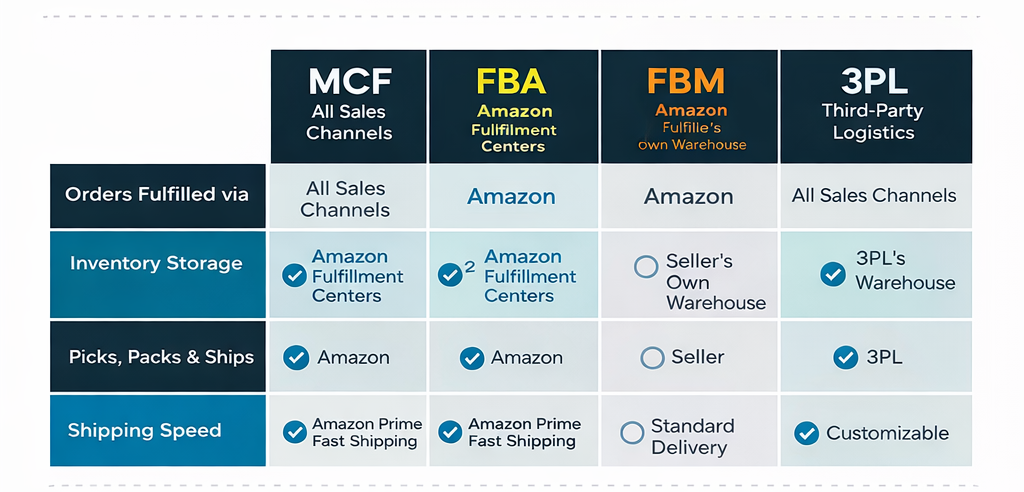
To clarify how MCF fits into the fulfillment ecosystem, consider this comparison table:
| Fulfillment Option | Seller-Managed (FBS/FBM) | Amazon MCF | Third-Party Logistics (3PL) |
|---|---|---|---|
| Definition | Seller (you) stores and ships products from your own location. FBS ("Fulfillment by Seller") and FBM ("Fulfilled by Merchant") are Amazon terms for self-fulfillment. | Amazon fulfills orders for you from its warehouses on any channel. Your products are still stored at Amazon (like FBA inventory) but can serve non-Amazon orders. | An independent logistics provider handles storage and shipping. This could be an external warehouse or courier network that you contract. |
| Who Can Use It | Any seller with or without Amazon account (FBM requires being an Amazon seller; FBS often in specific marketplaces). | Any business (Amazon seller or not) can use MCF. (If you have a Seller Central account, just start placing MCF orders.) | Any seller. No Amazon account needed. You arrange storage and shipping with the 3PL of your choice. |
| Sales Channels | Limited to Amazon.com: The order must be placed on Amazon. (FBS/FBM products are sold through Amazon's site.) | All channels: Amazon MCF can fulfill orders from Amazon and other channels (D2C website, Walmart, Flipkart, etc.). | All channels: The 3PL ships products wherever you need (your website, Amazon, other marketplaces) if integrated. |
| Inventory Location | Your warehouse/fulfillment center or office. | Amazon's fulfillment centers (same ones used for FBA). You send inventory to Amazon, and it is co-mingled in their network. | Third-party warehouses or drop-shippers (e.g. a fulfillment provider's facilities). You or they send inventory there. |
| Who Ships Orders? | You (or your couriers): You are responsible for packing and shipping each order. | Amazon: Amazon's staff picks, packs, and ships orders from its fulfillment centers. | 3PL provider: The external partner (not Amazon) handles order fulfillment. |
| Packaging | Your own branded packaging (you handle packing). | Standard Amazon-branded or blank boxes (no Amazon ads on box). Unbranded by default for privacy of channel. | Depends on 3PL; can often use branded packaging or neutral as agreed. |
| Shipping Speed & Tracking | Depends on your processes and chosen carrier. Usually slower. | Fast (2–3 days) via Amazon's network. Customers get Amazon-style tracking (Swiship/Amazon Logistics) and delivery promise. | Depends on 3PL and carriers used. You typically pay more for faster service; tracking integration varies by provider. |
| Returns Handling | You handle returns and customer service. | Amazon can handle returns through Seller Central (like FBA returns) if orders are tagged as MCF. Otherwise, you handle returns from your site. | The 3PL may handle returns on your behalf (if agreed) or you handle returns from your own facilities. |
| Prime Eligibility | Not Prime-eligible (unless you use Seller-Fulfilled Prime program, which has strict requirements). | MCF orders are not Prime (since they are off-Amazon orders). Products do not carry Prime badge unless included in a specific program. | Not Prime-eligible. Your products on Amazon only get Prime status via FBA or Seller-Fulfilled Prime, not via generic 3PL. |
| Common Use Case | Small sellers or low-volume who want control: e.g. niche sellers fulfilling orders themselves. | Sellers who want Amazon's logistics speed across channels: e.g. brands selling on their own site, Walmart, and Amazon simultaneously. | Large enterprises or those needing custom solutions: e.g. bulky goods, hazardous items, or multi-country logistics beyond Amazon. |
This table highlights that MCF is Amazon's own 3PL service: you benefit from Amazon-level speed and scale even when selling off-Amazon. Unlike pure self-fulfillment (FBS/FBM), Amazon handles all logistics for you. Unlike an external 3PL, MCF integrates seamlessly with your Amazon inventory and systems (and uses Amazon's carrier contracts).
Maximizing Your Business with MCF and Amazon Marketing
Using MCF to fulfill orders is only part of building a successful Amazon-based business. To fully capitalize on the expanded fulfillment capability, you should also optimize your selling and marketing strategy on Amazon and beyond. Key tactics include:
Optimize for Amazon Search
Use thorough keyword research to make sure your product listings rank high in Amazon search (see our guide on optimizing for Amazon search using keyword research). Focus on titles, bullet points, and backend keywords so that customers on Amazon find your products first. (If you're a brand-registered seller, Amazon Brand Analytics can further reveal top search terms and customer demographics.)
Expand Advertising (PPC and AMS)
Leverage Amazon's advertising solutions to drive traffic. Run Sponsored Products and Sponsored Brands campaigns to boost visibility. For detailed guidance, see our Amazon PPC tutorial. Additionally, Amazon Marketing Services (AMS) offers display ads and other ad types – learn about Amazon's marketing solutions and different types of Amazon ads. These ads, when combined with fast MCF delivery, create a seamless buying experience that encourages conversions.
Monitor Ad Performance (ACOS vs TACoS)
Keep a close eye on your advertising efficiency. Amazon's ACoS (Advertising Cost of Sale) and the broader TACoS (Total Advertising Cost of Sale) are key metrics. Understanding the difference between them (see our TACoS vs ACoS guide) will help you adjust bids and budgets. For example, using MCF to fulfill more orders can improve your TACoS by growing organic sales (making advertising spend a smaller percentage of total revenue).
Sell on Additional Marketplaces
In India, consider whether to also sell on Flipkart or other local marketplaces. We compare the pros and cons in our Amazon vs Flipkart for sellers article. If you list on multiple sites, Amazon MCF can often fulfill those orders too (subject to the marketplace's 3PL rules). Expanding to Flipkart might require separate inventory, but for social channels or your own site, MCF covers both Amazon and non-Amazon channels.
Earn Customer Trust
Fast, reliable shipping via MCF can boost customer satisfaction and reviews, which in turn can earn you badges like Best Seller. Plan to meet Amazon's performance targets (on-time rate, low defects) and deliver excellent service. Achieving Amazon's Best Seller Badge can dramatically increase visibility and sales – see our tips on ways to earn the Best Seller badge and its benefits.
By combining Amazon's fulfillment with savvy marketing (SEO, PPC, analytics), you maximize your growth potential. The synergy is powerful: MCF gives you the operational edge, while SEO and ads drive demand to fill your warehouses.
Getting Started with Amazon MCF
Ready to launch? If you already have an Amazon Seller Central account, no extra sign-up is needed. Simply go to the MCF section in Seller Central (or the Supply Chain by Amazon portal) to place your first fulfillment order. If you don't yet sell on Amazon, you can create a Supply Chain Portal account to access MCF as a standalone service. Once set up, configure your fulfillment settings, and start sending inventory to Amazon. From that point, any order you feed into MCF will be handled automatically.
Keep in mind: since MCF uses your FBA inventory, maintaining healthy stock levels at Amazon is important. Use Inventory Planning tools in Seller Central to forecast demand across all channels. Also, configure your shipping templates and enable Amazon's Shipping Settings Automation to get accurate delivery date promises for MCF orders. In short, treat MCF like an extension of your Amazon fulfillment – just with a broader reach.
Conclusion
To make the most of this advantage, be sure to optimize your Amazon Ads strategy end-to-end from search optimization to advertising. For example, you can learn how to set up effective campaigns in our Amazon PPC tutorial, which will help turn that expanded reach into higher sales. Whether you're new or experienced, integrating MCF is a practical way to scale your e-commerce business.
Amazon Multi-Channel Fulfillment unlocks Amazon's logistics power for your entire business. By consolidating inventory and outsourcing shipping to Amazon, sellers can offer fast, Amazon-like delivery on any platform. This improves customer experience and frees you to focus on product, marketing, and growth.
At GrowthJockey - Venture Builder, we help brands go beyond just “using” Amazon tools- we design end-to-end growth systems around them. From MCF-led fulfillment strategy and Amazon SEO to PPC, DSP, and marketplace expansion, we align operations, advertising, and demand generation so logistics actually translates into scalable revenue.
FAQ
Q1. What is MCF on Amazon?
MCF (Multi-Channel Fulfillment) is Amazon’s service that lets you use its warehouses and shipping network to fulfill orders from any sales channel, not just Amazon. You store inventory with Amazon, and Amazon ships orders from your website, other marketplaces, or apps.
Q2. What is the difference between Amazon MCF and FBA?
Both use Amazon fulfillment centers, but for different channels. FBA fulfills Amazon.com orders, while MCF fulfills off-Amazon orders like your website or other marketplaces. The same inventory can be used for both.
Q3. What does “MCF” mean in Amazon orders?
“MCF” in an order or shipment report means the order was fulfilled using Multi-Channel Fulfillment instead of standard FBA.
Q4. How do I find MCF orders on Amazon?
Go to Seller Central → Orders → Manage Orders to view MCF orders and tracking details. You can also retrieve MCF tracking programmatically using Amazon’s Selling Partner API.









Industries
Growth
Operations
Technology